
Split the bill
Research
UX DESIGN
UI Design
prototyping
Usability testing
[ About the project ]
Expense sharing in banking app
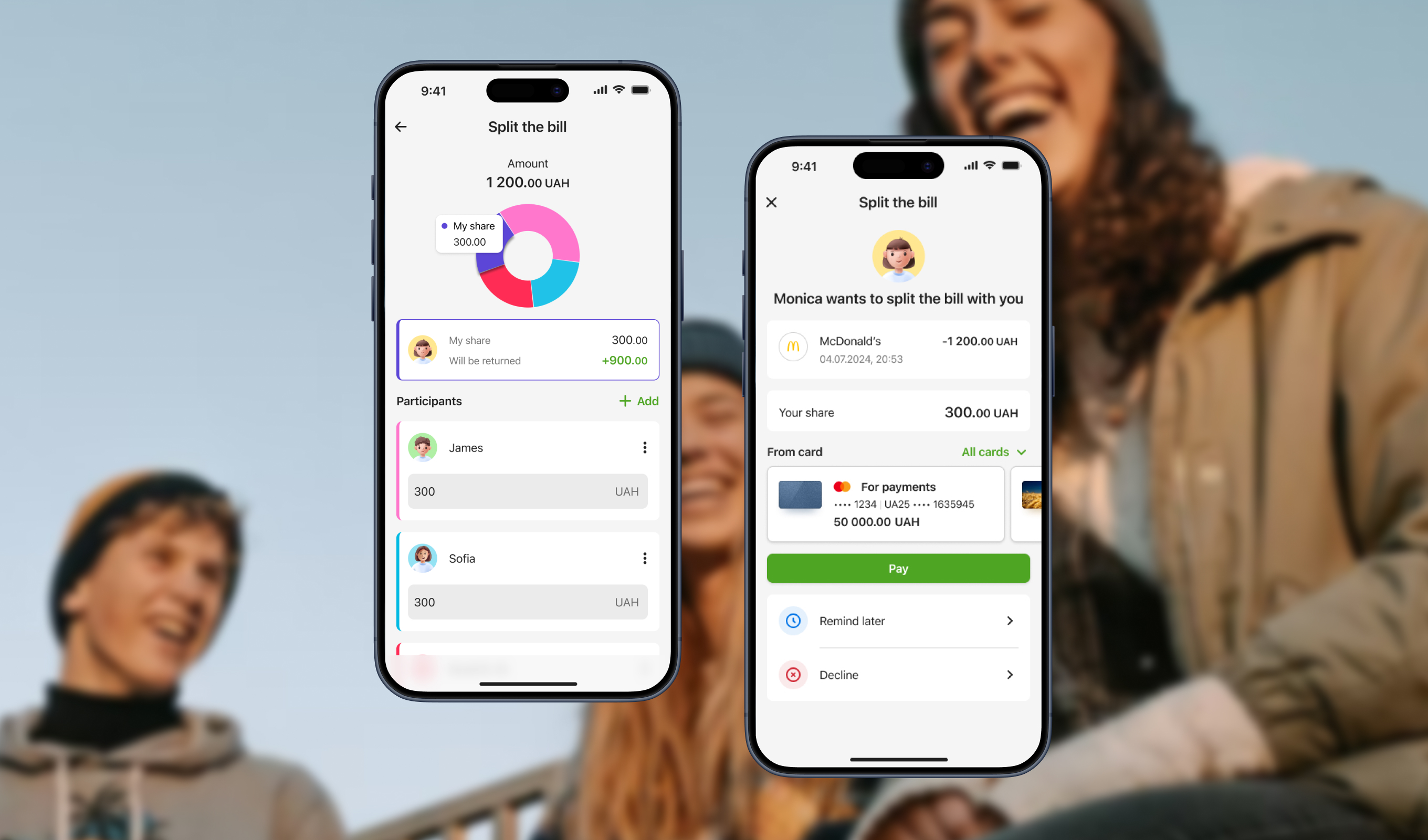
The Split the bill service allows users to quickly and securely share expenses with multiple people after dining out, traveling, or any shared activity
[ Challenge ]
Design a fast and transparent bill-splitting feature
Give both senders and recipients control, clarity, and confidence throughout the process
[ Challenge ]
Balance speed and user control
Most users wanted a fast, fair division of the bill, but some cases required adjustments (e.g., one person ordered more)
[ Task ]
User-friendly bill division options
Enable users to split bills easily, either equally or customly
[ Actions ]
Default and custom options
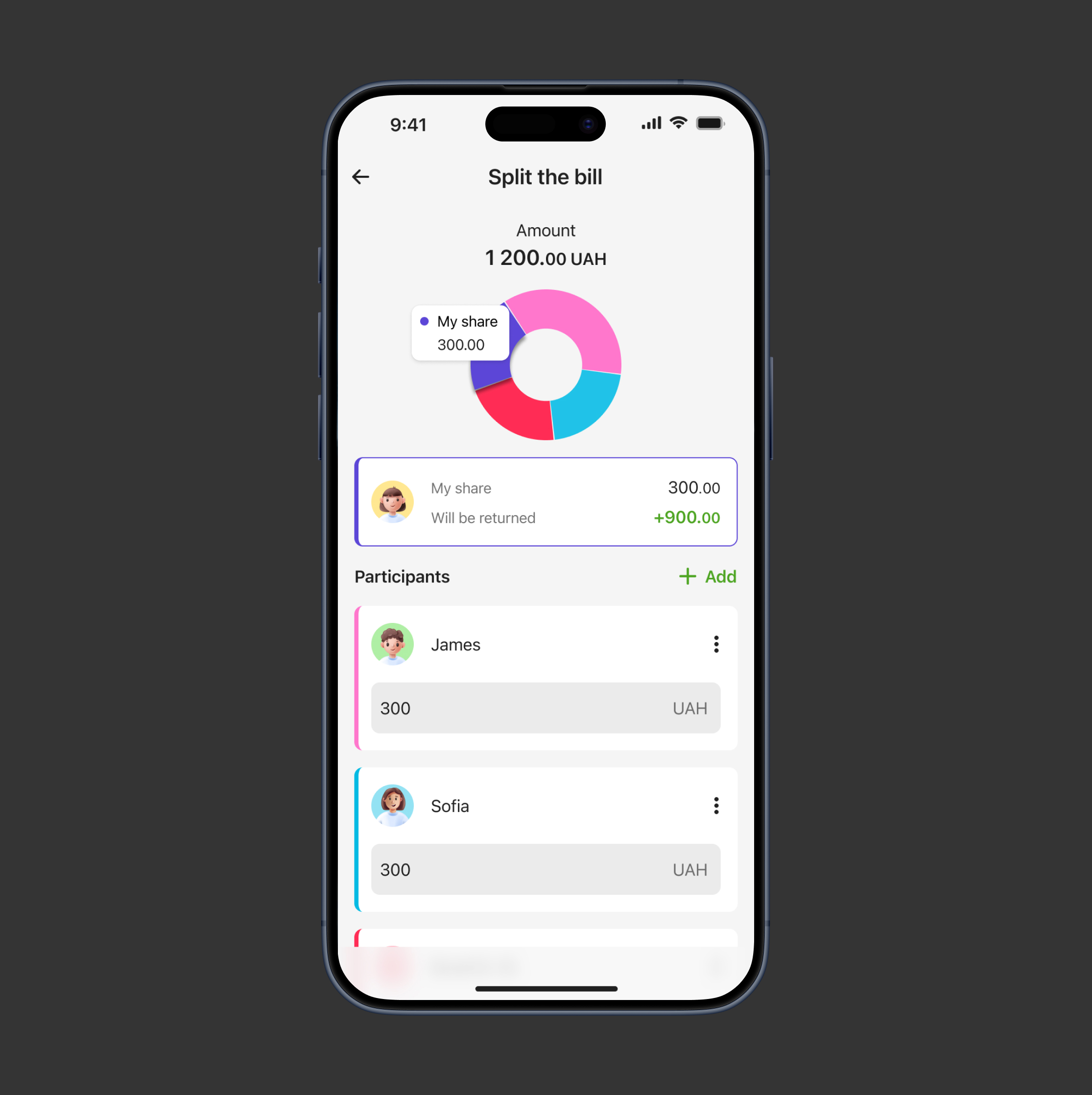
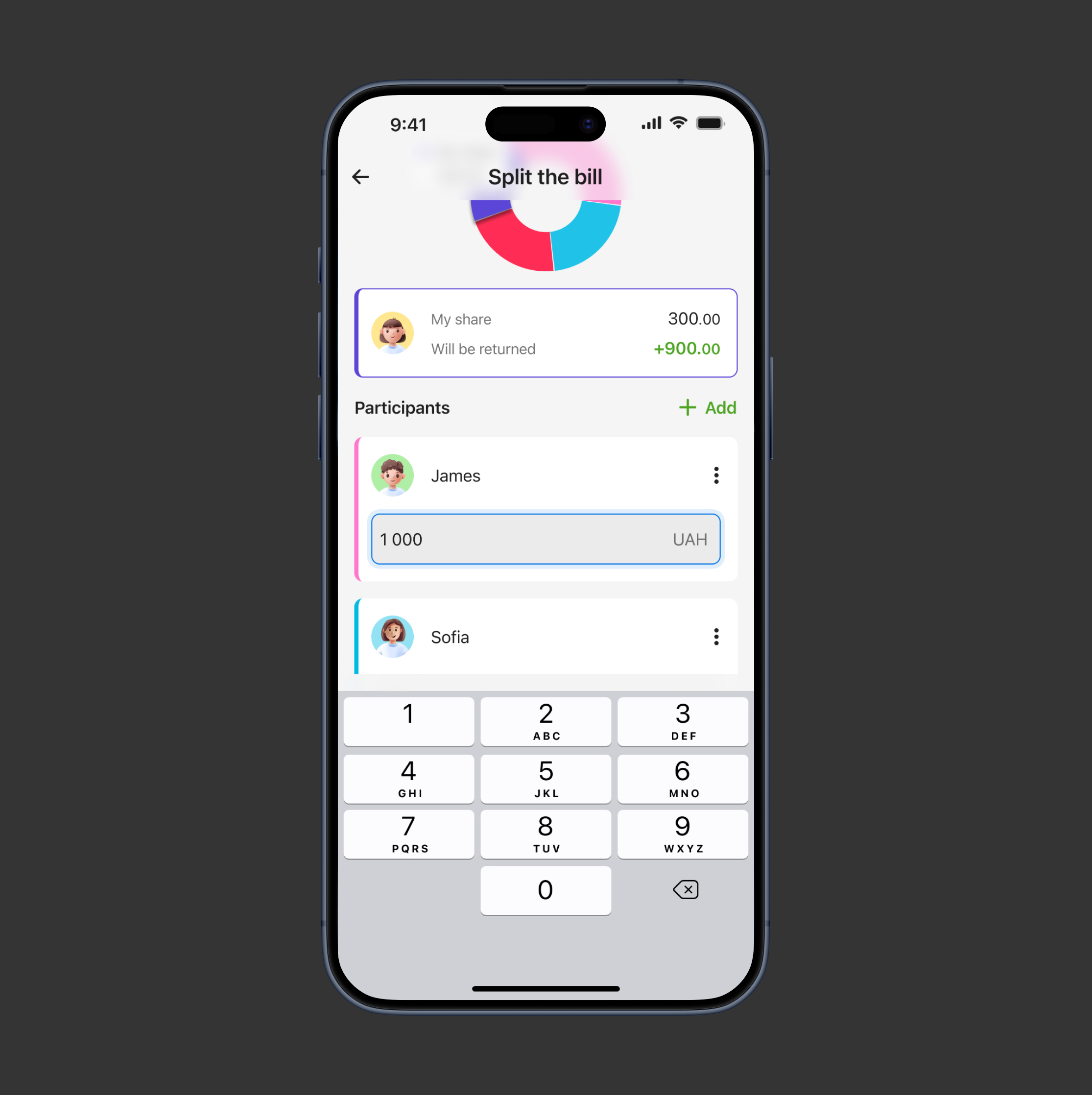
- Defaulted the split to equal amounts for speed
- Designed editable input fields for each participant with real-time validation
[ Result ]
Time-saving bill splits with flexible adjustments
Users saved time when splitting bills equally, eliminating the need for manual calculations while having the ability to adjust sums manually when needed
[ Challenge ]
Transparent requests
After setting amounts, users needed a way to send payment requests that clearly communicated the details
[ Task ]
User-friendly bill division options
Design a request flow that is simple and transparent for both sender and recipient
[ Actions ]
Clear summary with optional comments
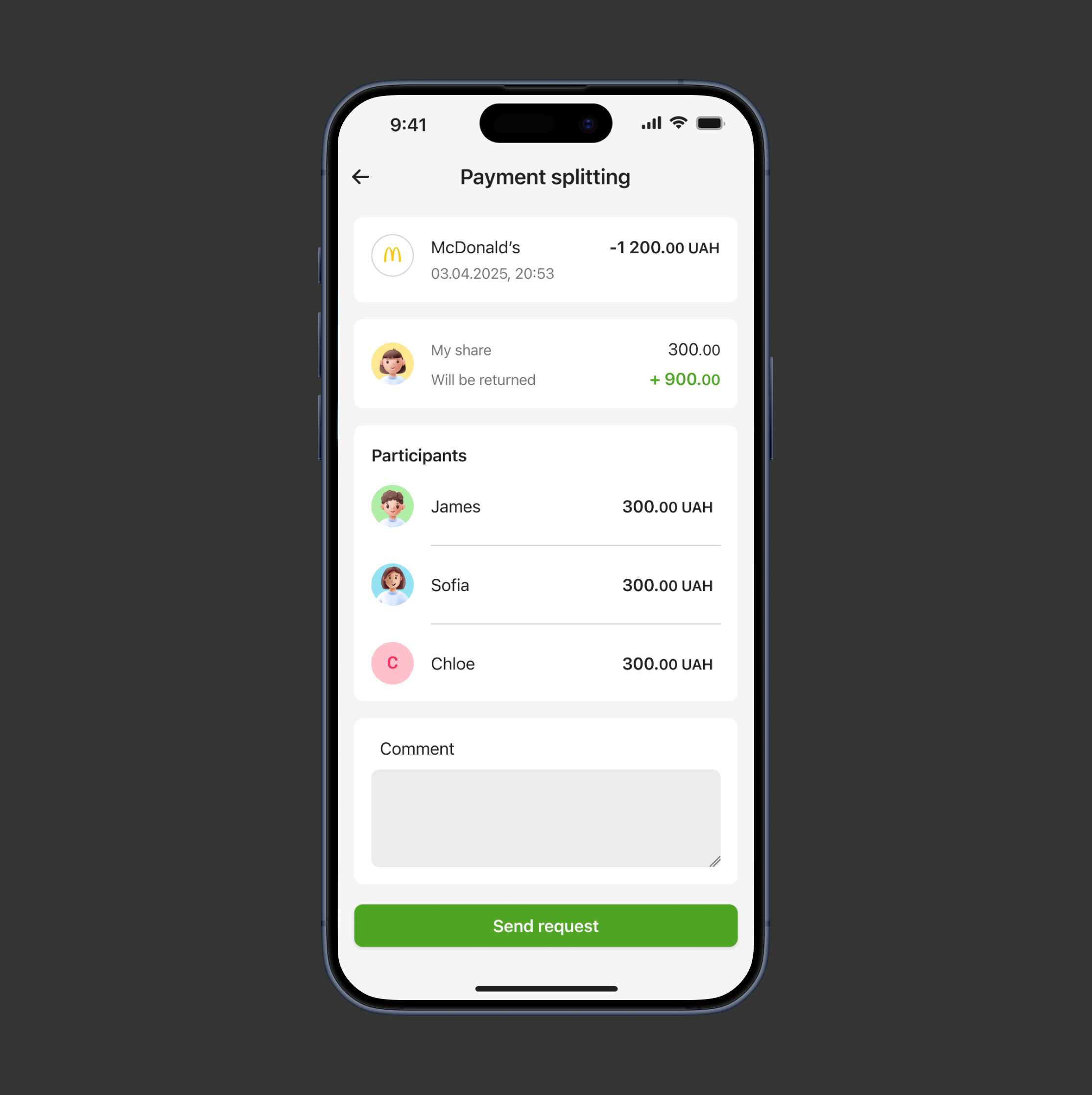
- Created a confirmation screen summarizing participants and amounts
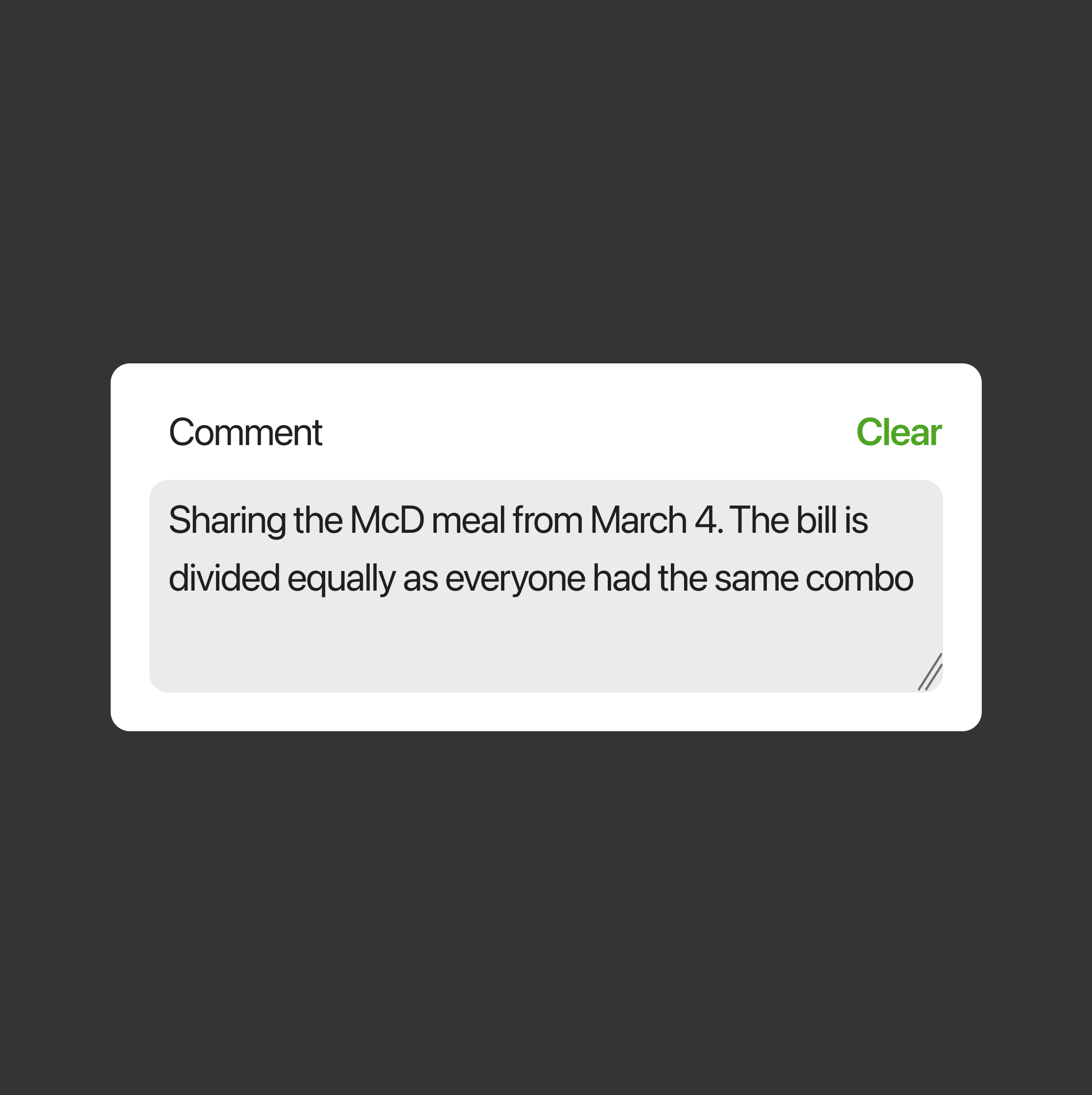
- Included optional comment for context
[ Result ]
Clear, confusion-free payment requests
Senders can review participants and amounts before sending requests and add necessary details about the bill, while recipients can clearly see and understand all information, ensuring transparency and minimizing confusion
[ Challenge ]
Post-send request management
Senders needed a way to manage split requests after they were sent
[ Task ]
Enable senders to monitor requests
Add an ability for senders to monitor and control requests
[ Actions ]
Added status, edits, and reminders
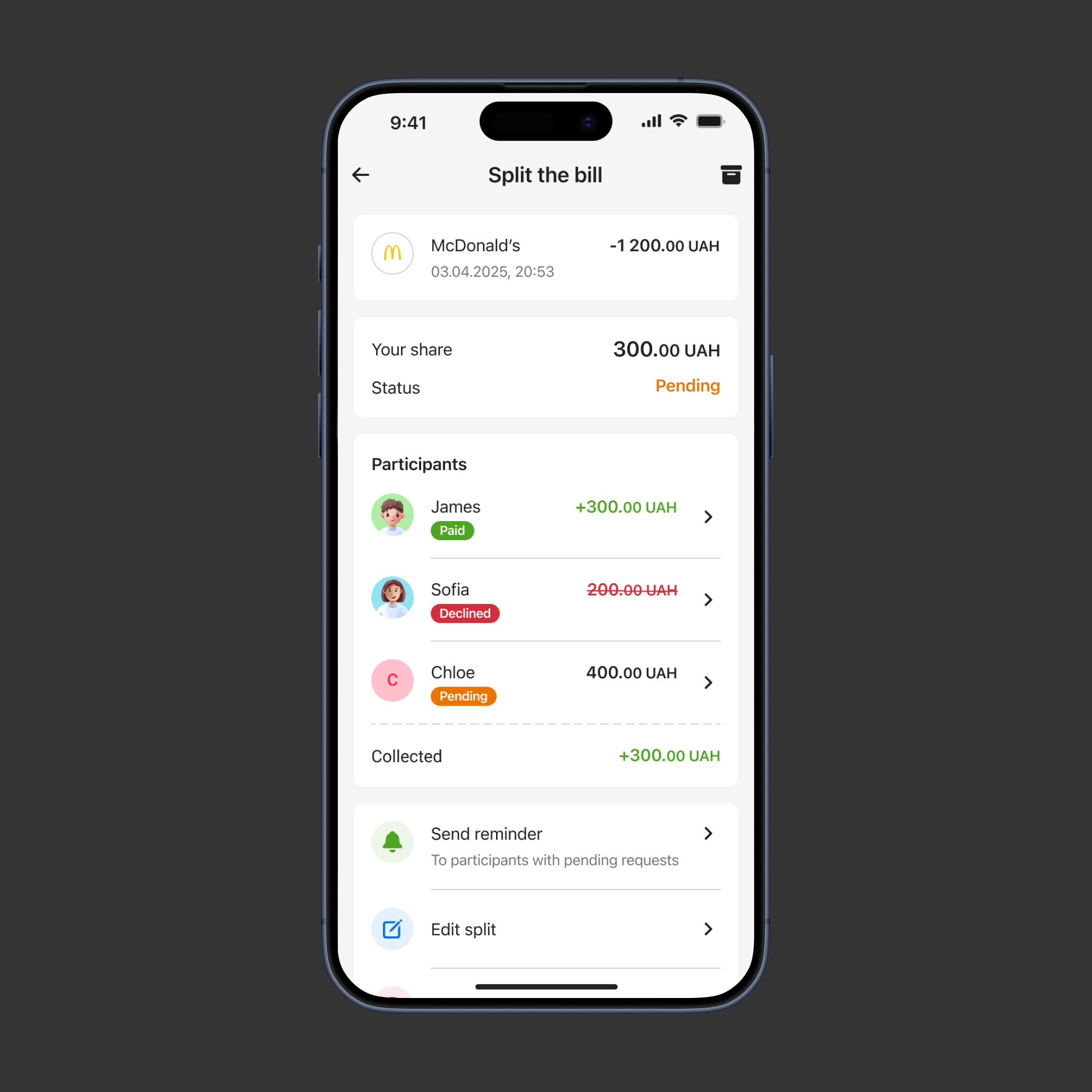
- Added status indicators for each recipient (paid, pending, declined)
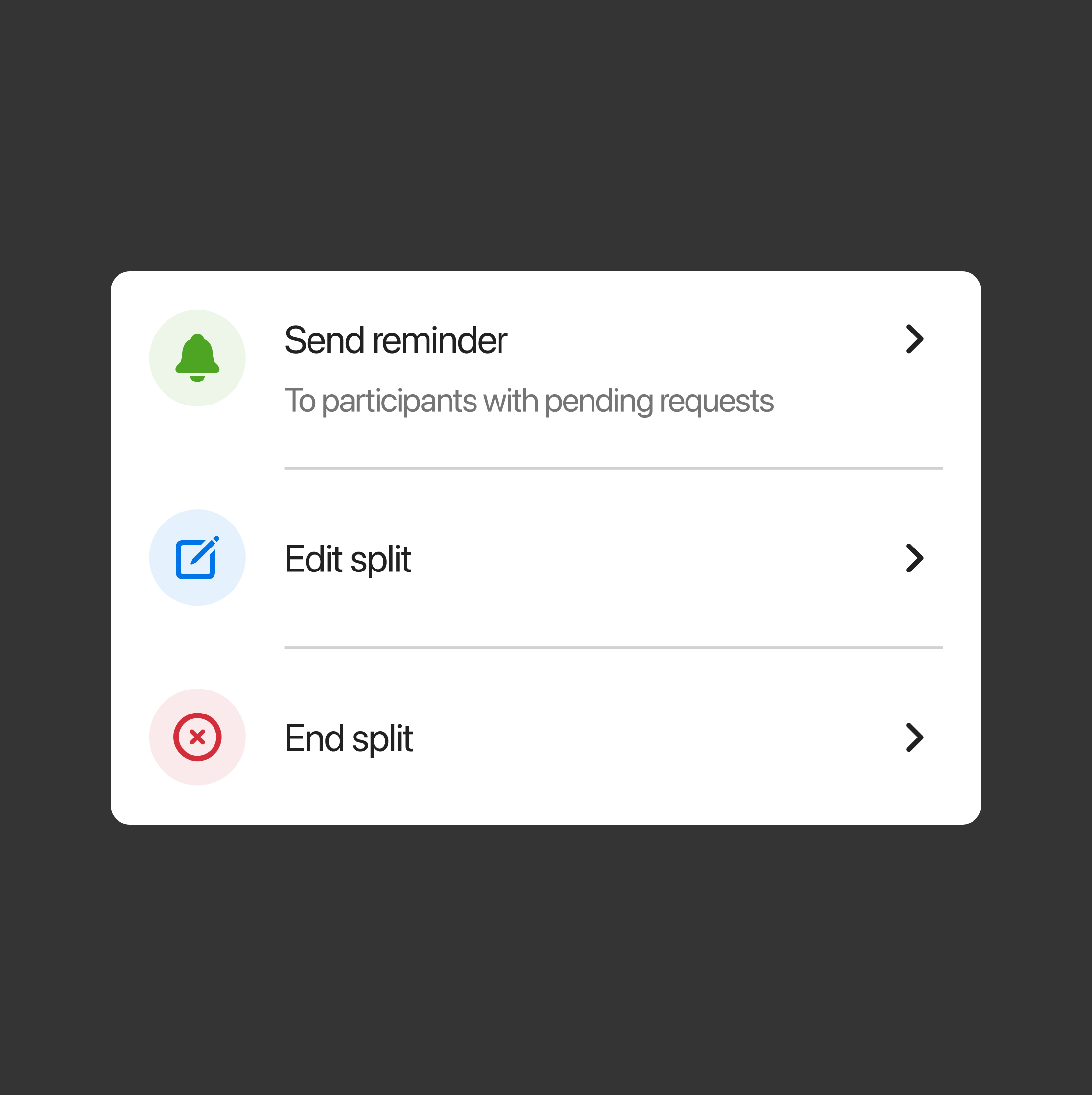
- Enabled senders to edit or cancel requests after sending
- Allowed senders to send reminders to recipients who had not yet paid
[ Result ]
Manageable split requests
Senders could easily track and manage all requests
[ Challenge ]
Control and confidence for recipients
Recipients needed flexibility in handling requests while maintaining safety and control
[ Task ]
Flexible options for recipients
Give recipients flexible options to manage incoming requests
[ Actions ]
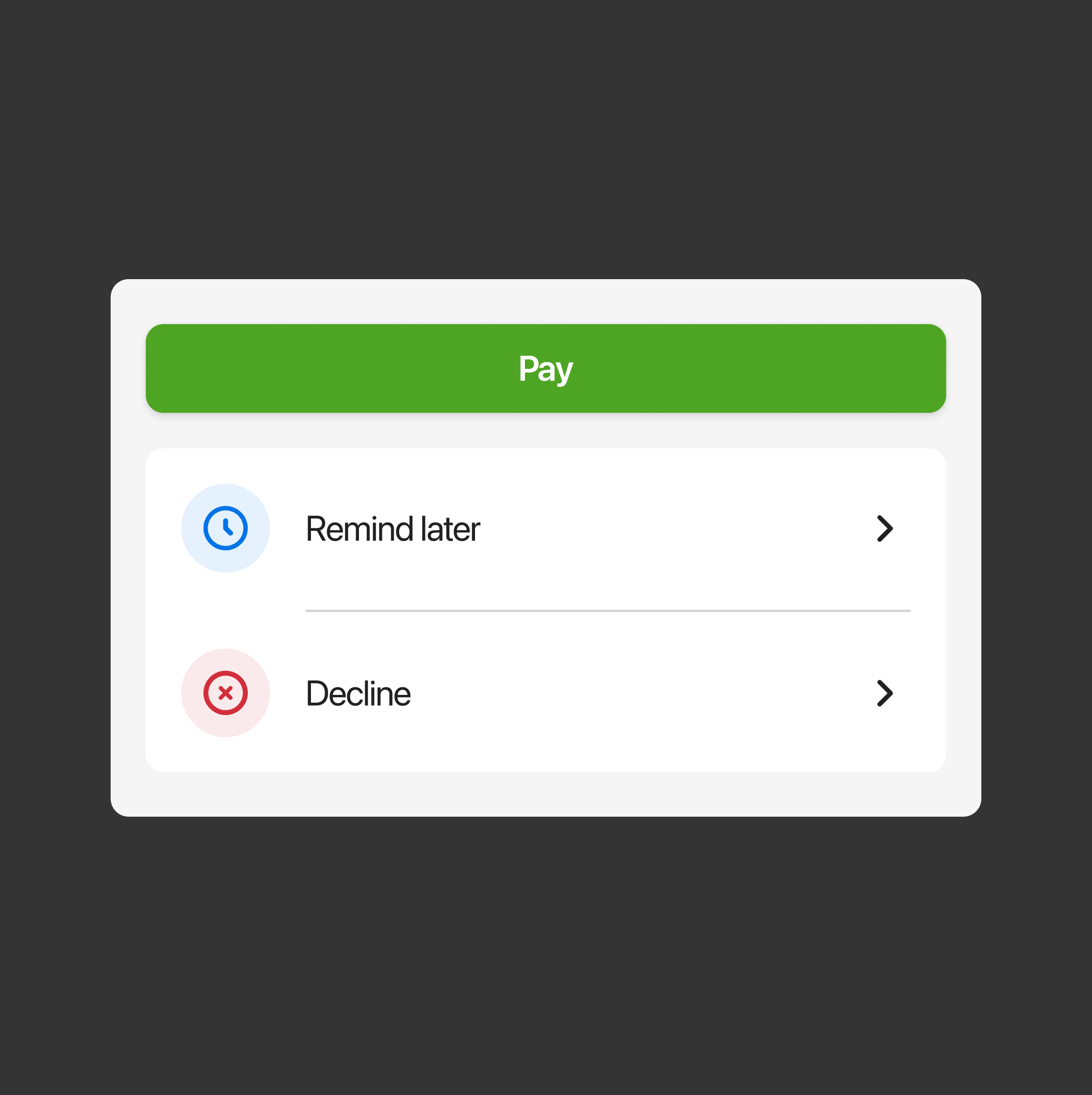
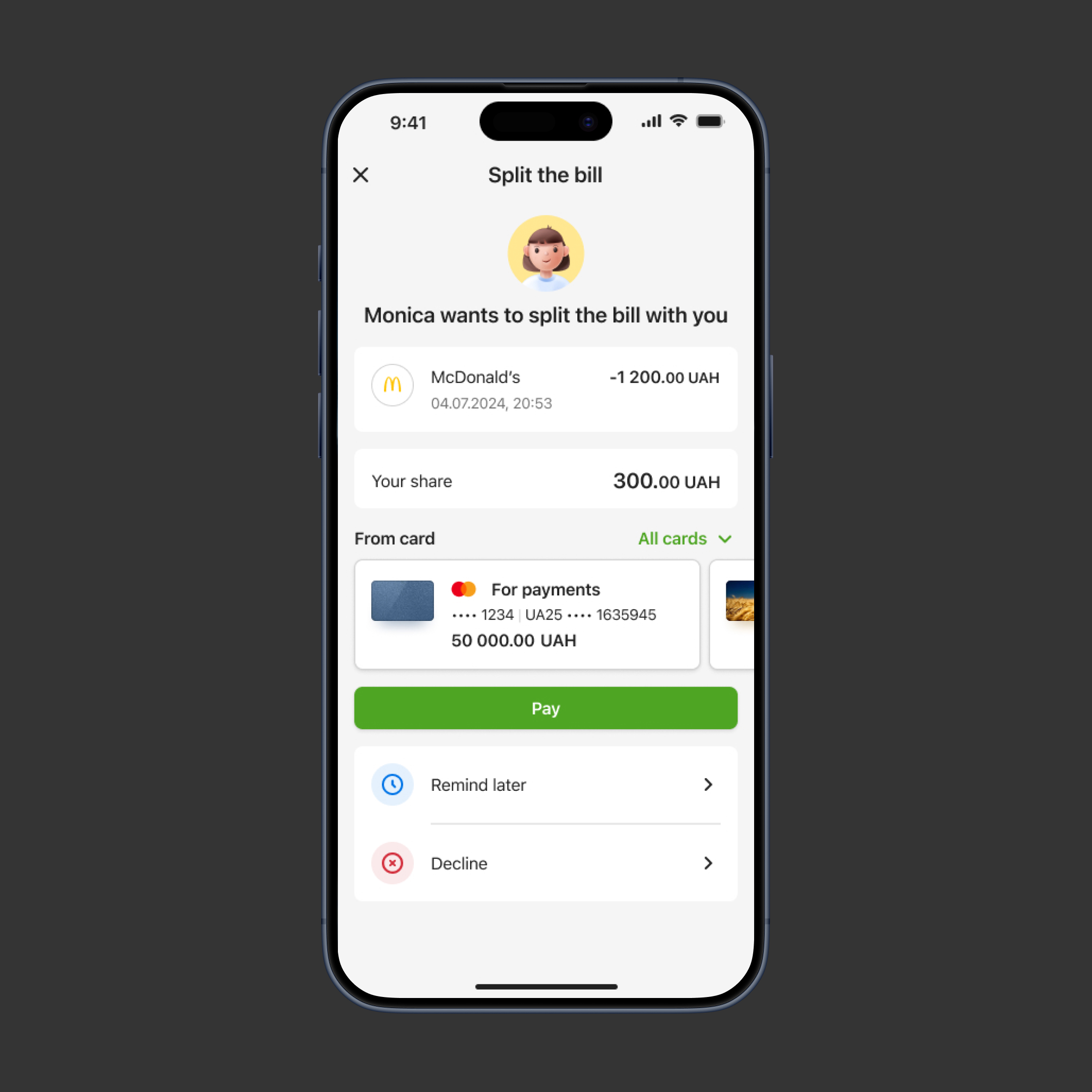
Recipient options: Pay, Remind later, or Decline
Provided options for recipients to respond immediately, delay payment, or reject request
[ Result ]
Effective request management for recipients
- Recipients felt safe managing requests
- Reduced unpaid or ignored requests by providing a ‘Remind later’ option
[ Challenge ]
The risk of spam requests
Recipients can receive irrelevant requests
[ Task ]
Protect recipients from spam requests
Design a way for recipients to protect themselves from spam requests
[ Actions ]
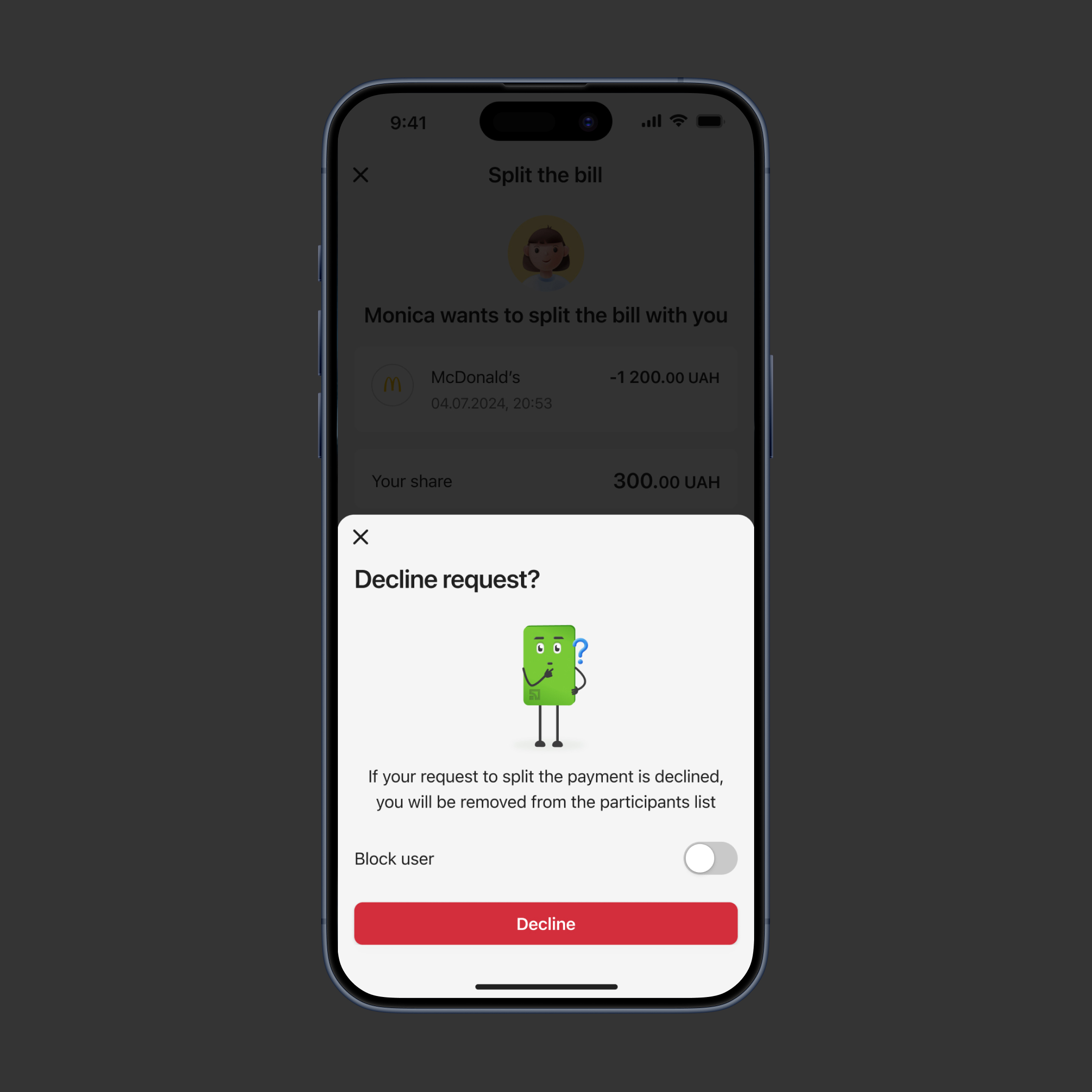
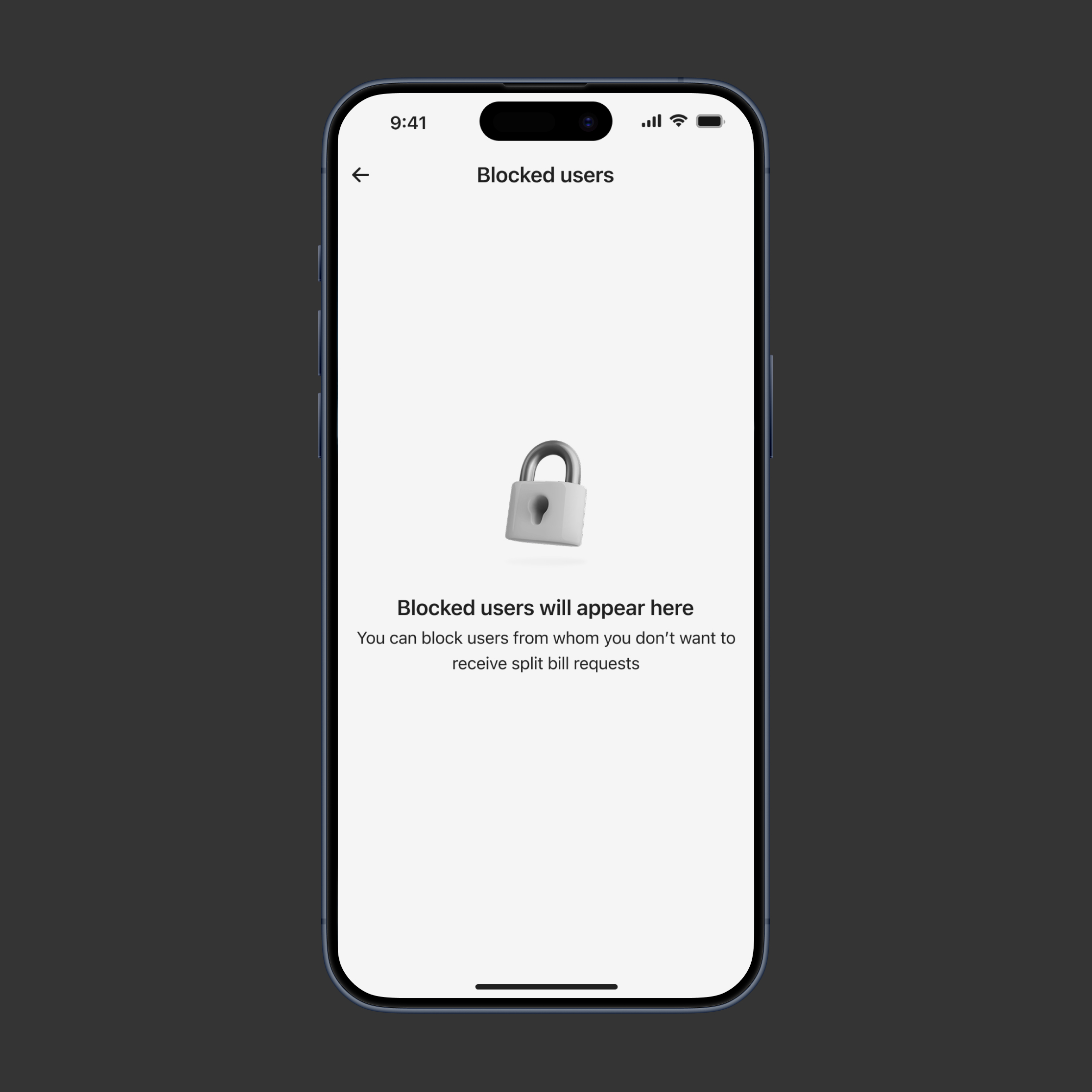
Recipient control: cancel and block
Added an option to block the sender when canceling request
[ Result ]
Recipients can effectively prevent spam
Increased user trust and confidence in managing requests safely

victoria29.vl@gmail.com
Split the bill
Research
UX DESIGN
UI Design
prototyping
Usability testing
[ About the project ]
Expense sharing in banking app
The Split the bill service allows users to quickly and securely share expenses with multiple people after dining out, traveling, or any shared activity
[ Challenge ]
Design a fast and transparent bill-splitting feature
Give both senders and recipients control, clarity, and confidence throughout the process
[ Challenge ]
Balance speed and user control
Most users wanted a fast, fair division of the bill, but some cases required adjustments (e.g., one person ordered more)
[ Task ]
User-friendly bill division options
Enable users to split bills easily, either equally or customly
[ Actions ]
Default and custom options
- Defaulted the split to equal amounts for speed
- Designed editable input fields for each participant with real-time validation
[ Result ]
Time-saving bill splits with flexible adjustments
Users saved time when splitting bills equally, eliminating the need for manual calculations while having the ability to adjust sums manually when needed
[ Challenge ]
Transparent requests
After setting amounts, users needed a way to send payment requests that clearly communicated the details
[ Task ]
User-friendly bill division options
Design a request flow that is simple and transparent for both sender and recipient
[ Actions ]
Clear summary with optional comments
- Created a confirmation screen summarizing participants and amounts
- Included optional comment for context
[ Result ]
Clear, confusion-free payment requests
Senders can review participants and amounts before sending requests and add necessary details about the bill, while recipients can clearly see and understand all information, ensuring transparency and minimizing confusion
[ Challenge ]
Post-send request management
Senders needed a way to manage split requests after they were sent
[ Task ]
Enable senders to monitor requests
Add an ability for senders to monitor and control requests
[ Actions ]
Added status, edits, and reminders
- Added status indicators for each recipient (paid, pending, declined)
- Enabled senders to edit or cancel requests after sending
- Allowed senders to send reminders to recipients who had not yet paid
[ Result ]
Manageable split requests
Senders could easily track and manage all requests
[ Challenge ]
Control and confidence for recipients
Recipients needed flexibility in handling requests while maintaining safety and control
[ Task ]
Flexible options for recipients
Give recipients flexible options to manage incoming requests
[ Actions ]
Recipient options: Pay, Remind later, or Decline
Provided options for recipients to respond immediately, delay payment, or reject request
[ Result ]
Effective request management for recipients
- Recipients felt safe managing requests
- Reduced unpaid or ignored requests by providing a ‘Remind later’ option
[ Challenge ]
The risk of spam requests
Recipients can receive irrelevant requests
[ Task ]
Protect recipients from spam requests
Design a way for recipients to protect themselves from spam requests
[ Actions ]
Recipient control: cancel and block
Added an option to block the sender when canceling request
[ Result ]
Recipients can effectively prevent spam
Increased user trust and confidence in managing requests safely

victoria29.vl@gmail.com
Split the bill
Research
UX DESIGN
UI Design
prototyping
Usability testing
[ About the project ]
Expense sharing in banking app
The Split the bill service allows users to quickly and securely share expenses with multiple people after dining out, traveling, or any shared activity
[ Challenge ]
Design a fast and transparent bill-splitting feature
Give both senders and recipients control, clarity, and confidence throughout the process
[ Challenge ]
Balance speed and user control
Most users wanted a fast, fair division of the bill, but some cases required adjustments (e.g., one person ordered more)
[ Task ]
User-friendly bill division options
Enable users to split bills easily, either equally or customly
[ Actions ]
Default and custom options
- Defaulted the split to equal amounts for speed
- Designed editable input fields for each participant with real-time validation
[ Result ]
Time-saving bill splits with flexible adjustments
Users saved time when splitting bills equally, eliminating the need for manual calculations while having the ability to adjust sums manually when needed
[ Challenge ]
Transparent requests
After setting amounts, users needed a way to send payment requests that clearly communicated the details
[ Task ]
User-friendly bill division options
Design a request flow that is simple and transparent for both sender and recipient
[ Actions ]
Clear summary with optional comments
- Created a confirmation screen summarizing participants and amounts
- Included optional comment for context
[ Result ]
Clear, confusion-free payment requests
Senders can review participants and amounts before sending requests and add necessary details about the bill, while recipients can clearly see and understand all information, ensuring transparency and minimizing confusion
[ Challenge ]
Post-send request management
Senders needed a way to manage split requests after they were sent
[ Task ]
Enable senders to monitor requests
Add an ability for senders to monitor and control requests
[ Actions ]
Added status, edits, and reminders
- Added status indicators for each recipient (paid, pending, declined)
- Enabled senders to edit or cancel requests after sending
- Allowed senders to send reminders to recipients who had not yet paid
[ Result ]
Manageable split requests
Senders could easily track and manage all requests
[ Challenge ]
Control and confidence for recipients
Recipients needed flexibility in handling requests while maintaining safety and control
[ Task ]
Flexible options for recipients
Give recipients flexible options to manage incoming requests
[ Actions ]
Recipient options: Pay, Remind later, or Decline
Provided options for recipients to respond immediately, delay payment, or reject request
[ Result ]
Effective request management for recipients
- Recipients felt safe managing requests
- Reduced unpaid or ignored requests by providing a ‘Remind later’ option
[ Challenge ]
The risk of spam requests
Recipients can receive irrelevant requests
[ Task ]
Protect recipients from spam requests
Design a way for recipients to protect themselves from spam requests
[ Actions ]
Recipient control: cancel and block
Added an option to block the sender when canceling request
[ Result ]
Recipients can effectively prevent spam
Increased user trust and confidence in managing requests safely

victoria29.vl@gmail.com
Split the bill
Research
UX DESIGN
UI Design
prototyping
Usability testing
[ About the project ]
Expense sharing in banking app
The Split the bill service allows users to quickly and securely share expenses with multiple people after dining out, traveling, or any shared activity
[ Challenge ]
Design a fast and transparent bill-splitting feature
Give both senders and recipients control, clarity, and confidence throughout the process
[ Challenge ]
Balance speed and user control
Most users wanted a fast, fair division of the bill, but some cases required adjustments (e.g., one person ordered more)
[ Task ]
User-friendly bill division options
Enable users to split bills easily, either equally or customly
[ Actions ]
Default and custom options
- Defaulted the split to equal amounts for speed
- Designed editable input fields for each participant with real-time validation
[ Result ]
Time-saving bill splits with flexible adjustments
Users saved time when splitting bills equally, eliminating the need for manual calculations while having the ability to adjust sums manually when needed
[ Challenge ]
Transparent requests
After setting amounts, users needed a way to send payment requests that clearly communicated the details
[ Task ]
User-friendly bill division options
Design a request flow that is simple and transparent for both sender and recipient
[ Actions ]
Clear summary with optional comments
- Created a confirmation screen summarizing participants and amounts
- Included optional comment for context
[ Result ]
Clear, confusion-free payment requests
Senders can review participants and amounts before sending requests and add necessary details about the bill, while recipients can clearly see and understand all information, ensuring transparency and minimizing confusion
[ Challenge ]
Post-send request management
Senders needed a way to manage split requests after they were sent
[ Task ]
Enable senders to monitor requests
Add an ability for senders to monitor and control requests
[ Actions ]
Added status, edits, and reminders
- Added status indicators for each recipient (paid, pending, declined)
- Enabled senders to edit or cancel requests after sending
- Allowed senders to send reminders to recipients who had not yet paid
[ Result ]
Manageable split requests
Senders could easily track and manage all requests
[ Challenge ]
Control and confidence for recipients
Recipients needed flexibility in handling requests while maintaining safety and control
[ Task ]
Flexible options for recipients
Give recipients flexible options to manage incoming requests
[ Actions ]
Recipient options: Pay, Remind later, or Decline
Provided options for recipients to respond immediately, delay payment, or reject request
[ Result ]
Effective request management for recipients
- Recipients felt safe managing requests
- Reduced unpaid or ignored requests by providing a ‘Remind later’ option
[ Challenge ]
The risk of spam requests
Recipients can receive irrelevant requests
[ Task ]
Protect recipients from spam requests
Design a way for recipients to protect themselves from spam requests
[ Actions ]
Recipient control: cancel and block
Added an option to block the sender when canceling request
[ Result ]
Recipients can effectively prevent spam
Increased user trust and confidence in managing requests safely
