
Transfer funds
Research
UX DESIGN
UI Design
prototyping
Usability testing
[ About the project ]
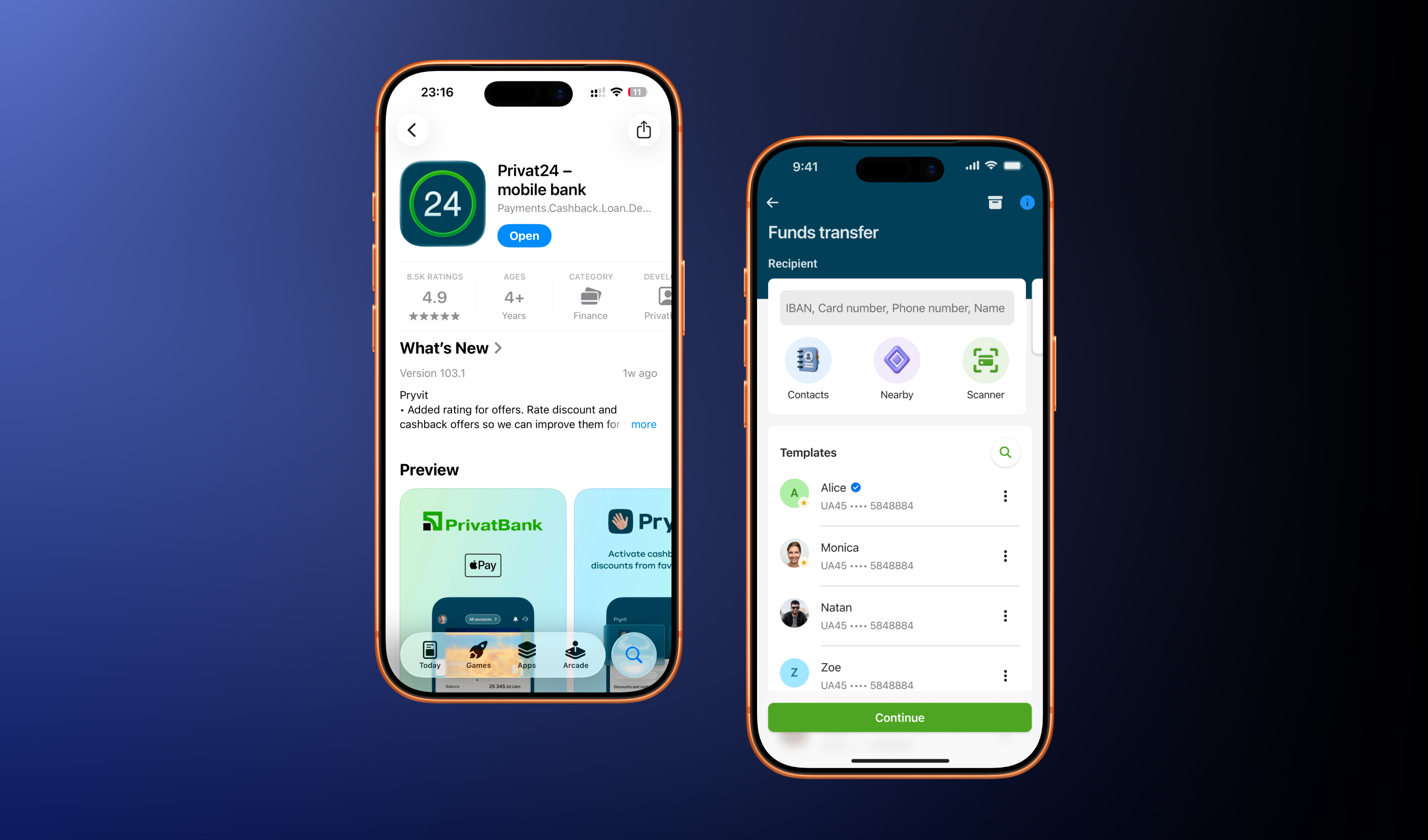
Funds Transfer redesign
The Funds Transfer is the key and the most frequently used services at PrivatBank that allows users to send money from their accounts to other recipients
[ Challenge ]
Faster, Safer, More intuitive
The redesign of PrivatBank’s Funds Transfer service aimed to make sending money faster, safer, and more intuitive. It focused on expanding transfer options, improving templates, reducing errors and modernizing the interface to improve usability and build user trust
[ Challenge ]
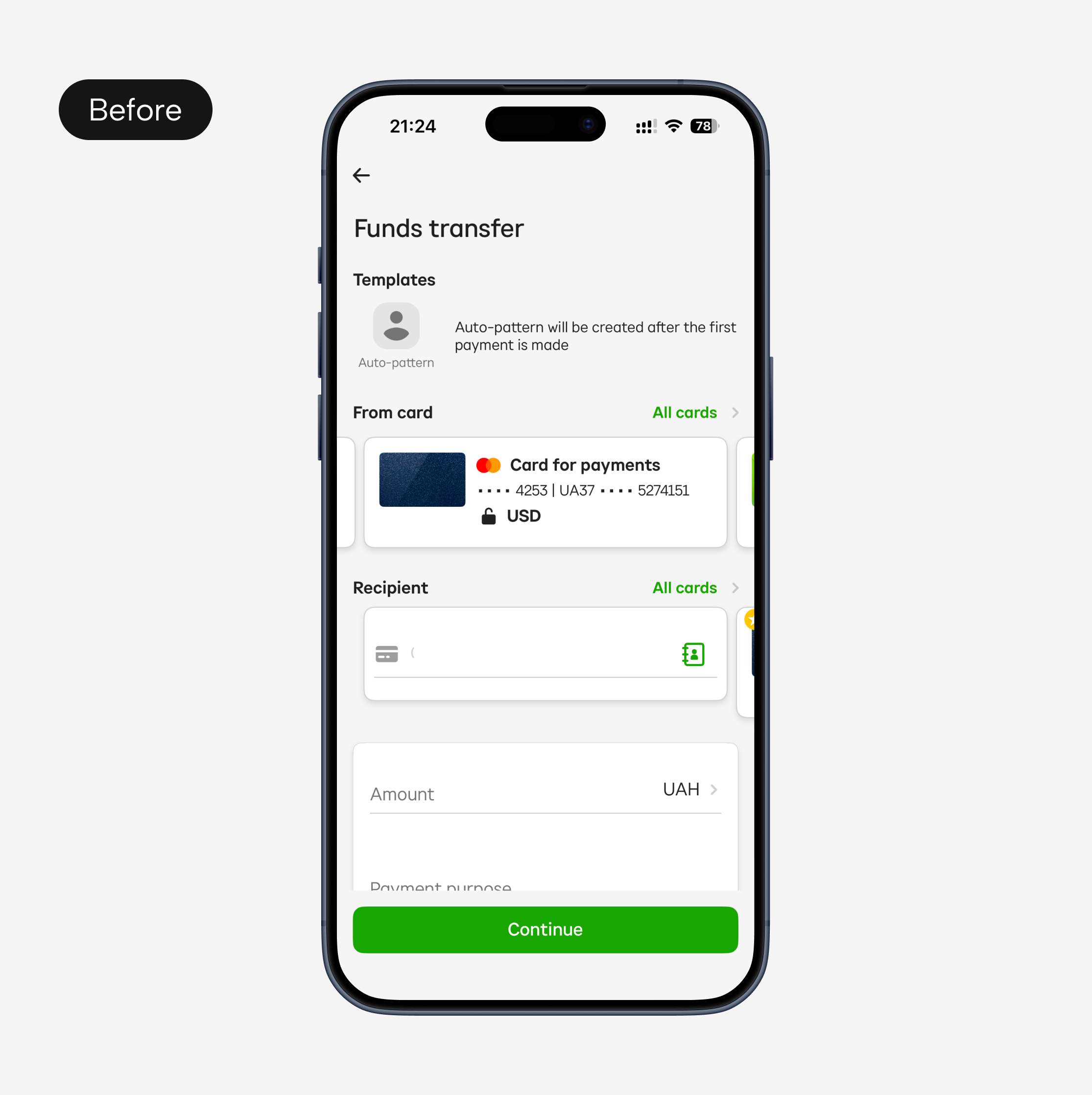
Limited transfer options
Users could only make card-to-card transfers
[ Task ]
Introduce multiple transfer methods
Transfer using IBAN, card number, phone number, or recipient name
[ Action ]
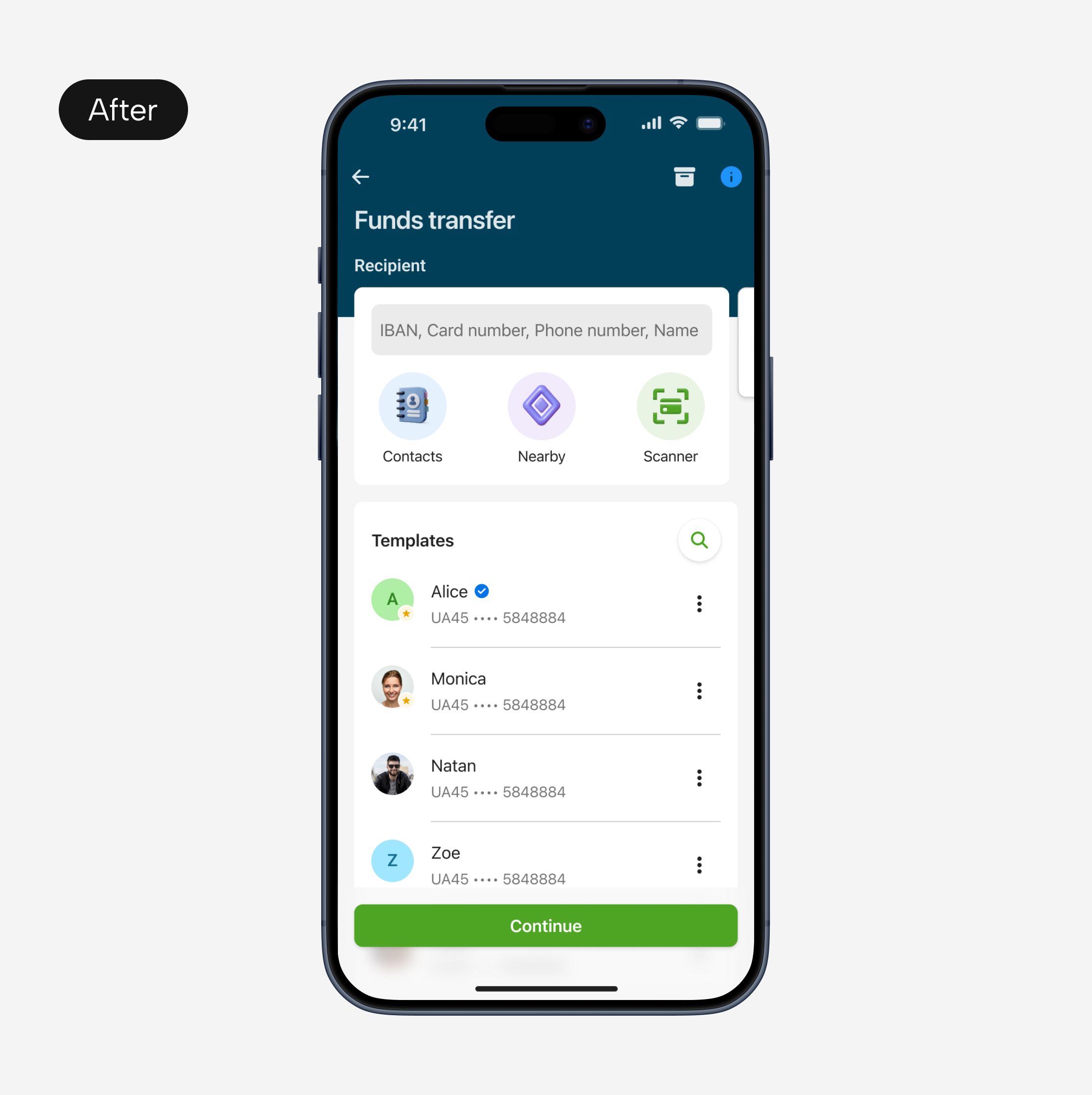
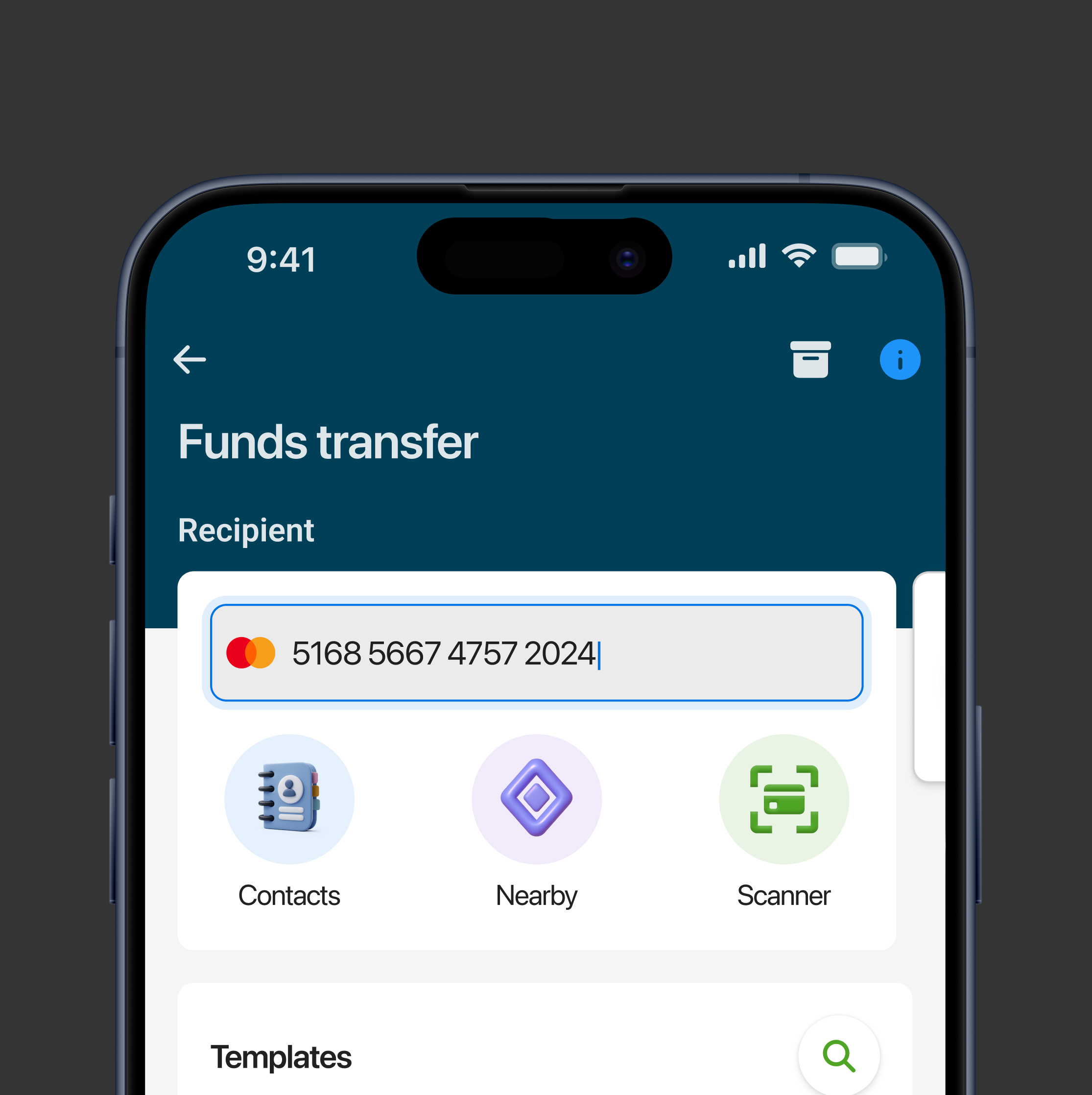
Added a ‘Super field’
‘Super field’ is a single input field where users can enter IBAN, card number, phone number, or recipient name, the system automatically detects the type of input and routes the transfer correctly
[ Result ]
Faster, safer, and more convenient transfers
- Reduced errors as automatic detection minimized mistakes when entering recipient information
- Reduced time to make a transfer as all transfer types are placed in one field
- Increased user satisfaction and trust, as the app now supports modern and convenient payment methods
[ Challenge ]
Manual entry slowed transfers and increased errors
Manually entering recipient details made transfers slow and easy to make a mistake
[ Task ]
Introduce alternative transfer methods
Introduce methods that will make the transfers easier and faster
[ Action ]
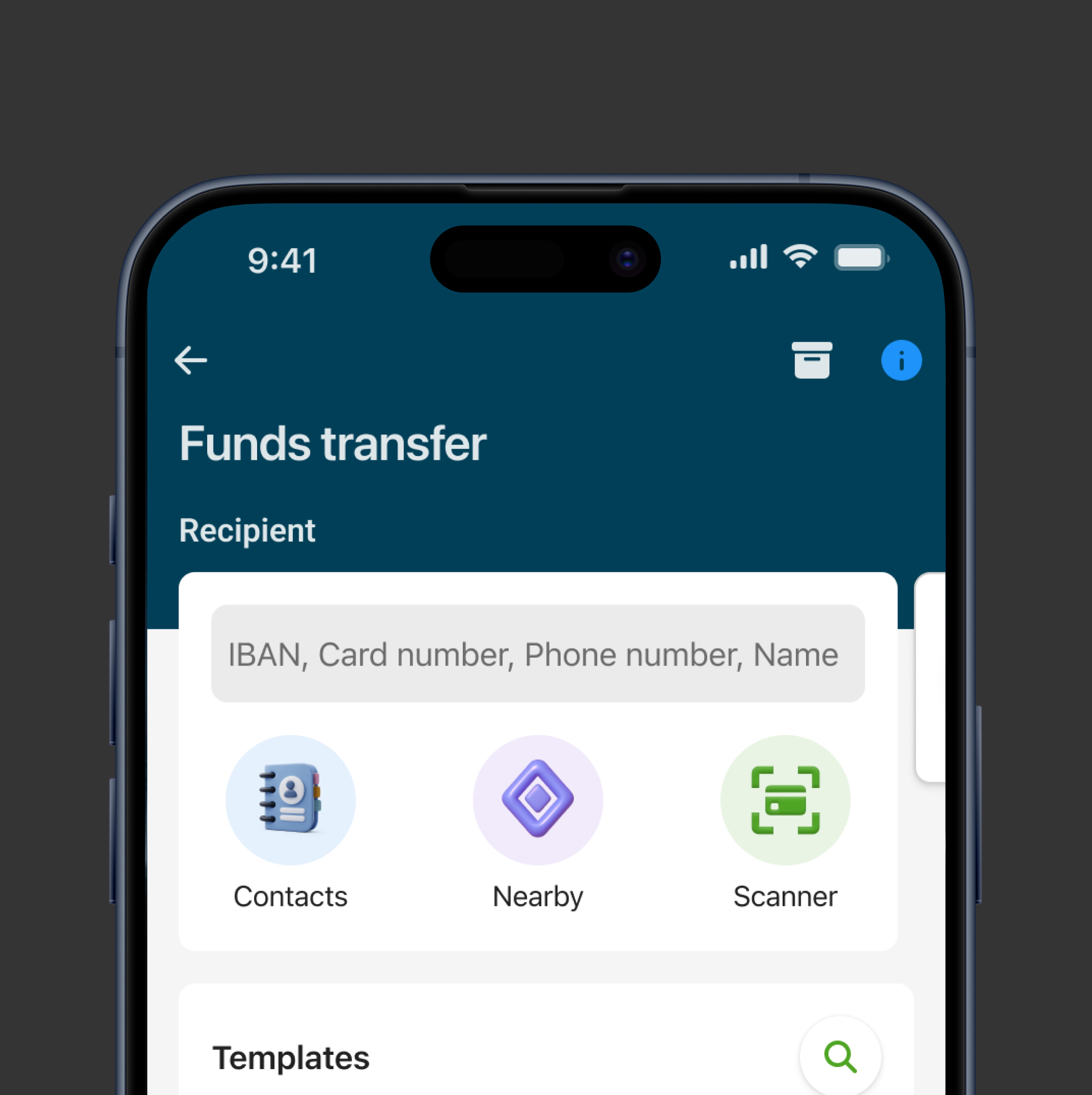
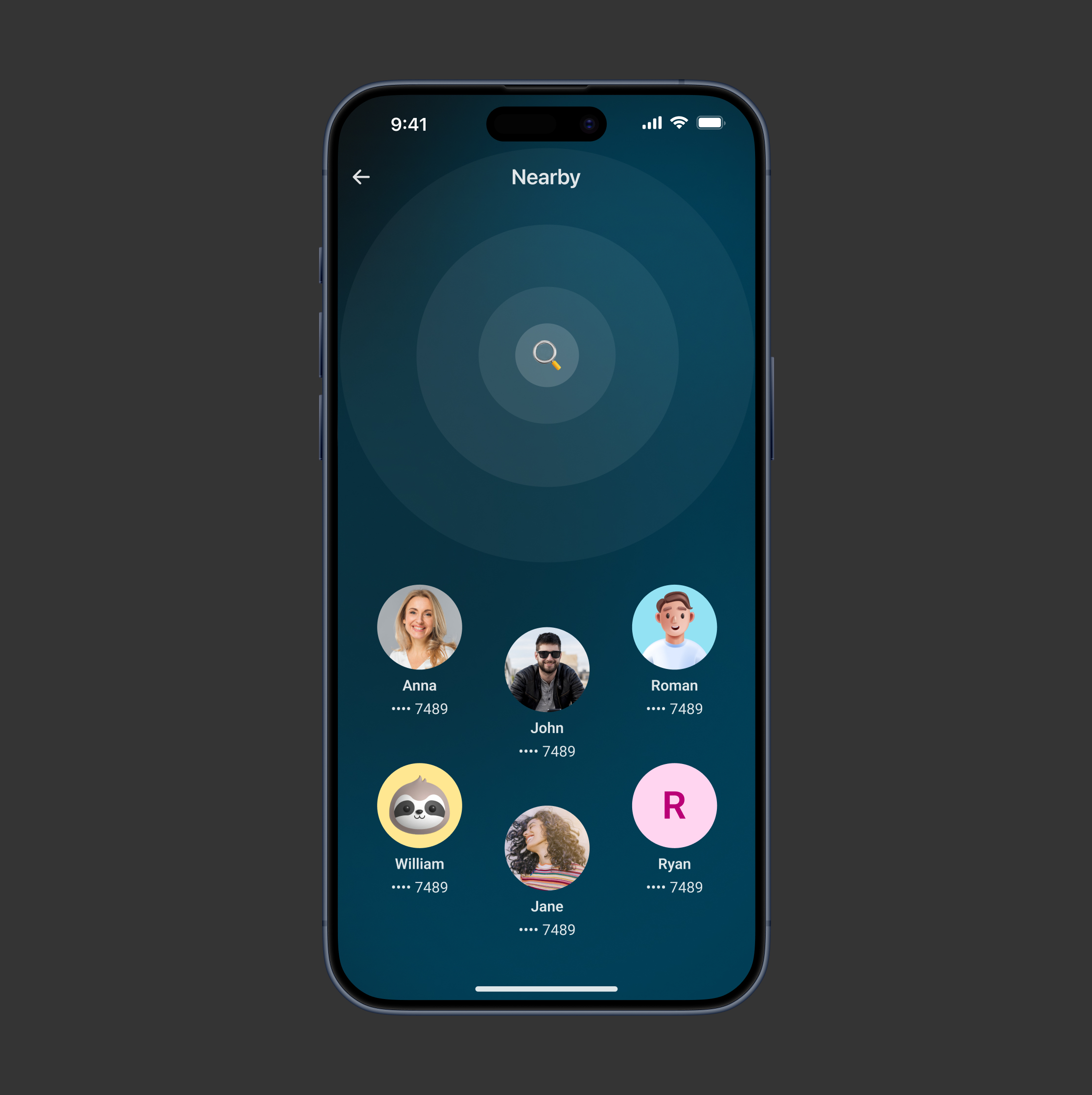
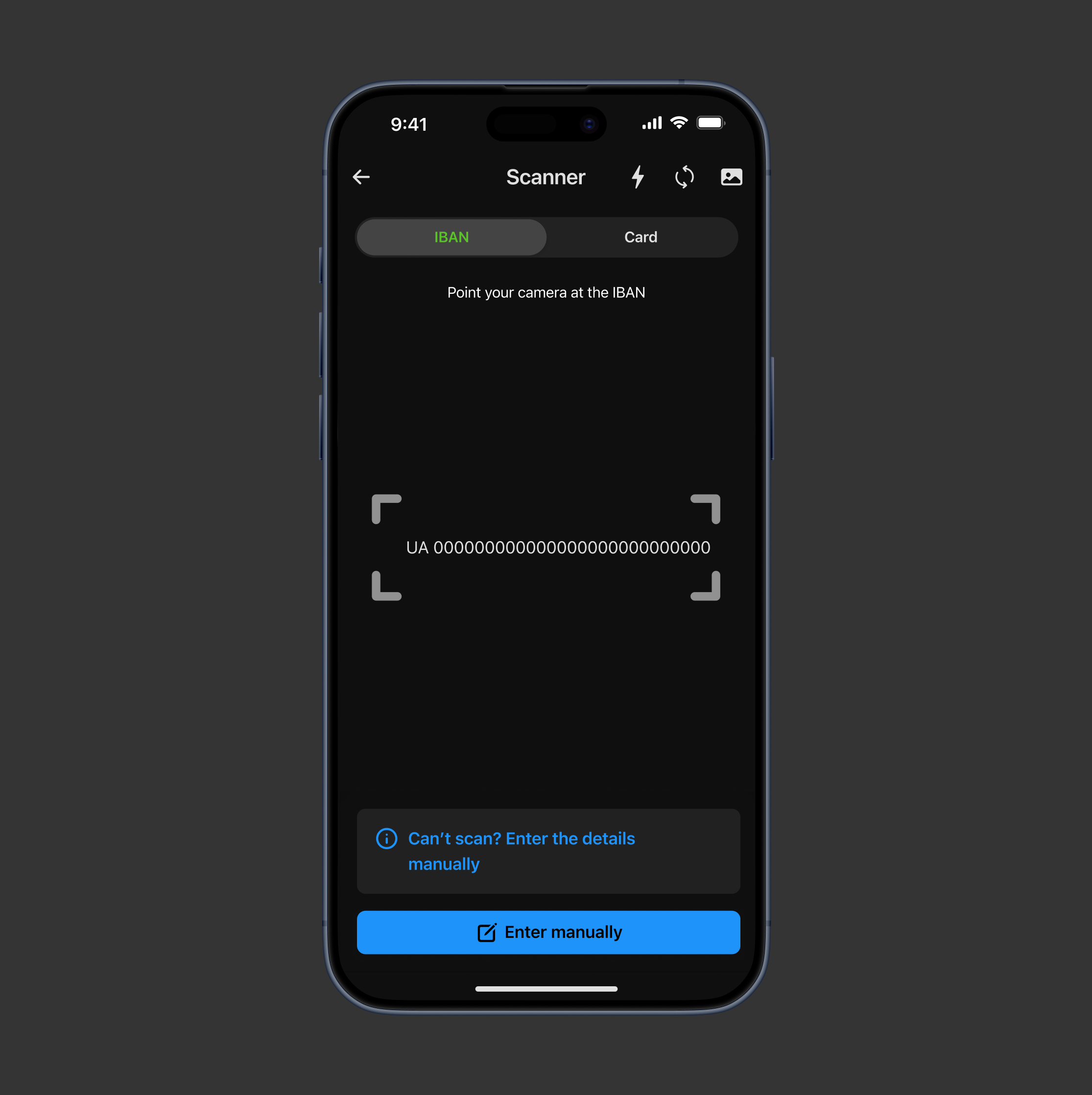
Added Nearby transfers and Scanner
Allowed users to send money to people nearby or scan a card or IBAN for fast, accurate transfers with fewer errors
[ Result ]
Faster input and fewer errors
- Reduced manual input time
- Reduced errors as automatic recognition from scanning or nearby detection minimizes mistakes when entering recipient details
[ Challenge ]
Overwhelming template list
Every transfer was automatically saved as a template. Over time, users ended up with dozens of templates, making it hard to find the right recipient
[ Task ]
Simplify template management
Make it easy for users to access the templates they actually need
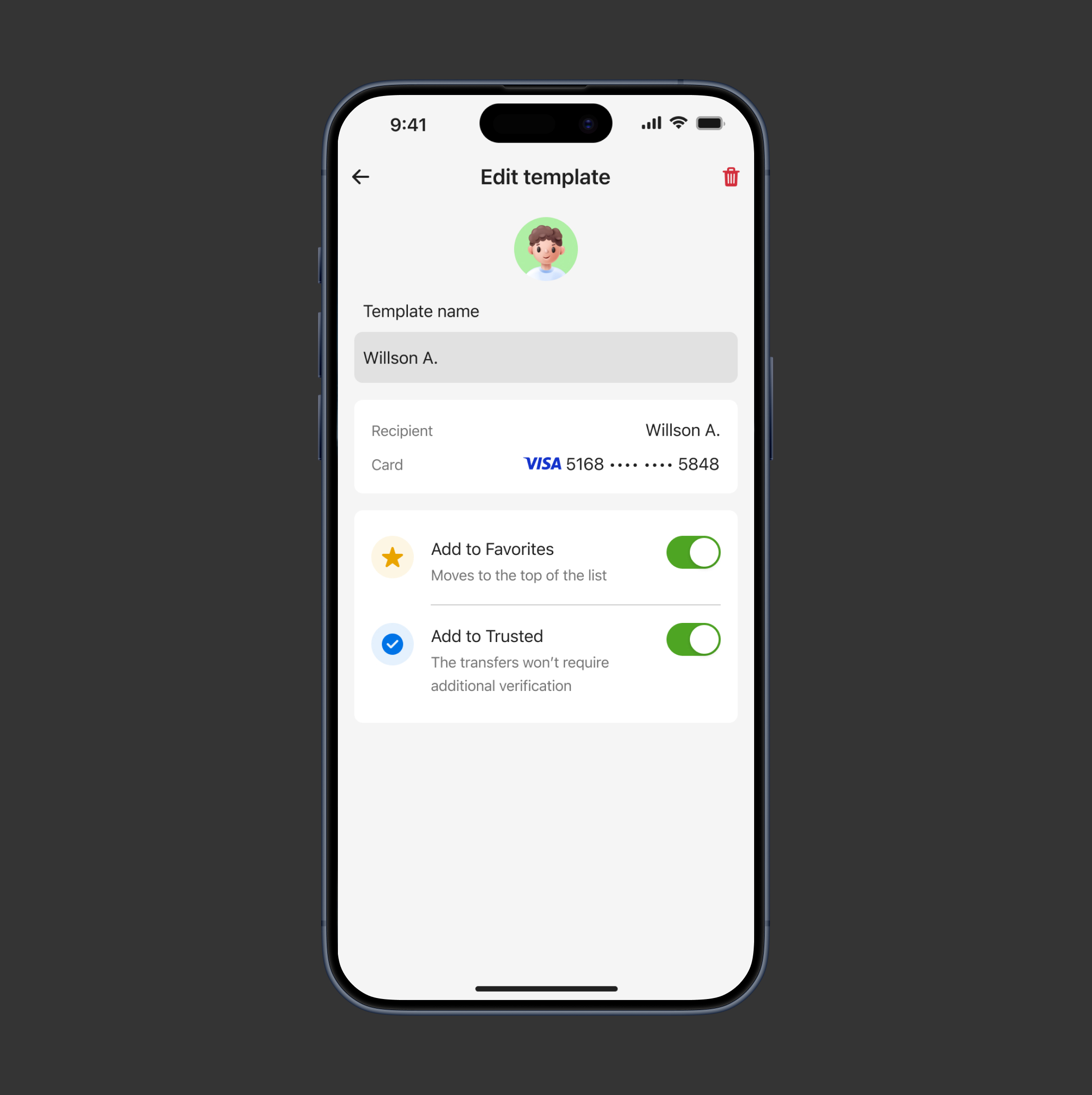
[ Action ]
User-controlled templates
Allowed users to decide whether a transfer should be saved as a template, allowed users to customize templates by marking frequently used templates as favorites
[ Result ]
Reduced friction and time to complete transaction
Trusted users can receive large transfers without repeated verification
[ Challenge ]
Repetitive security steps for large transfers
Sending large amounts always required extra verification
[ Task ]
Make the process of sending large transfers faster
Reduce repetitive security steps, while maintaining user trust and system security
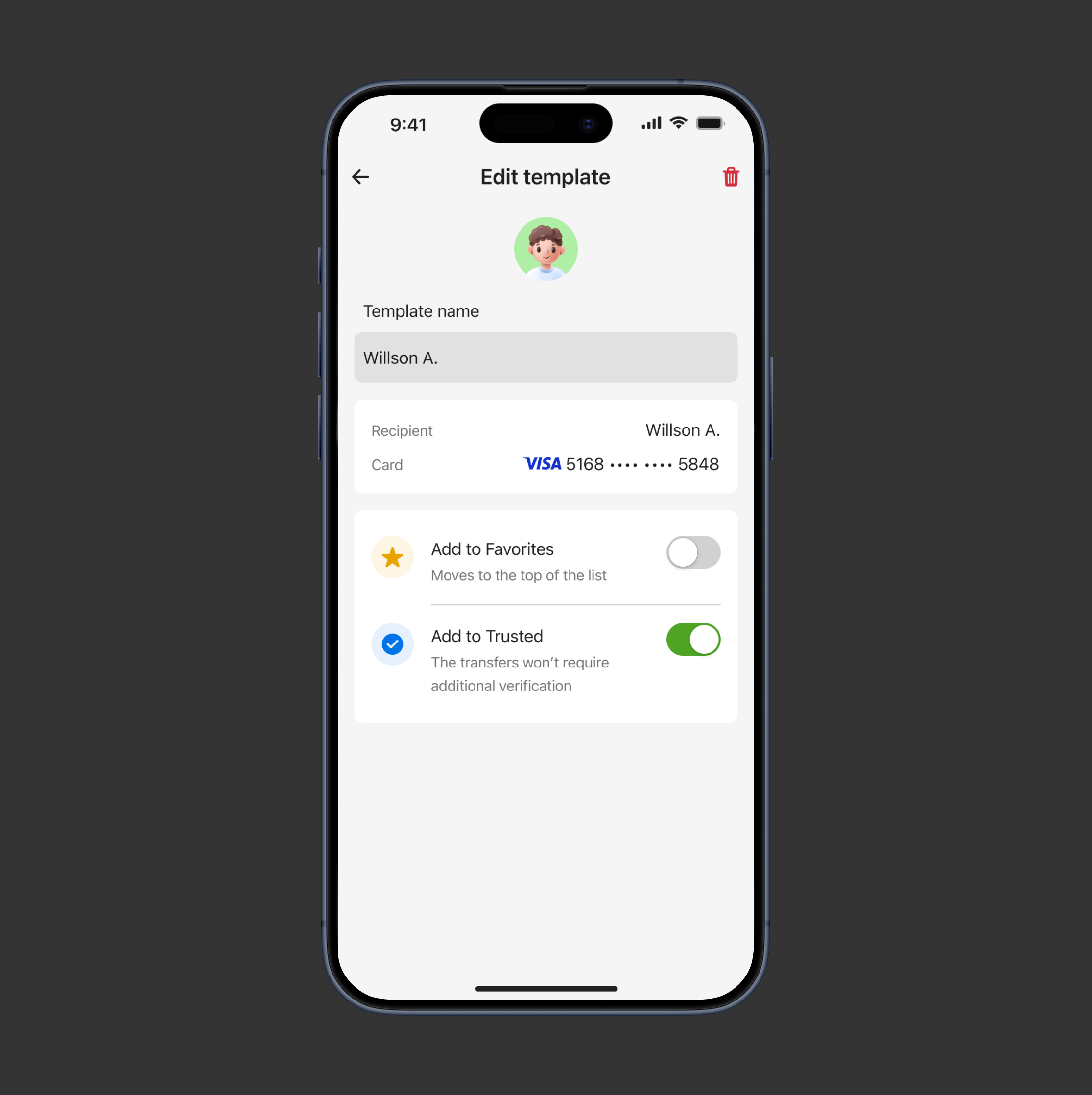
[ Action ]
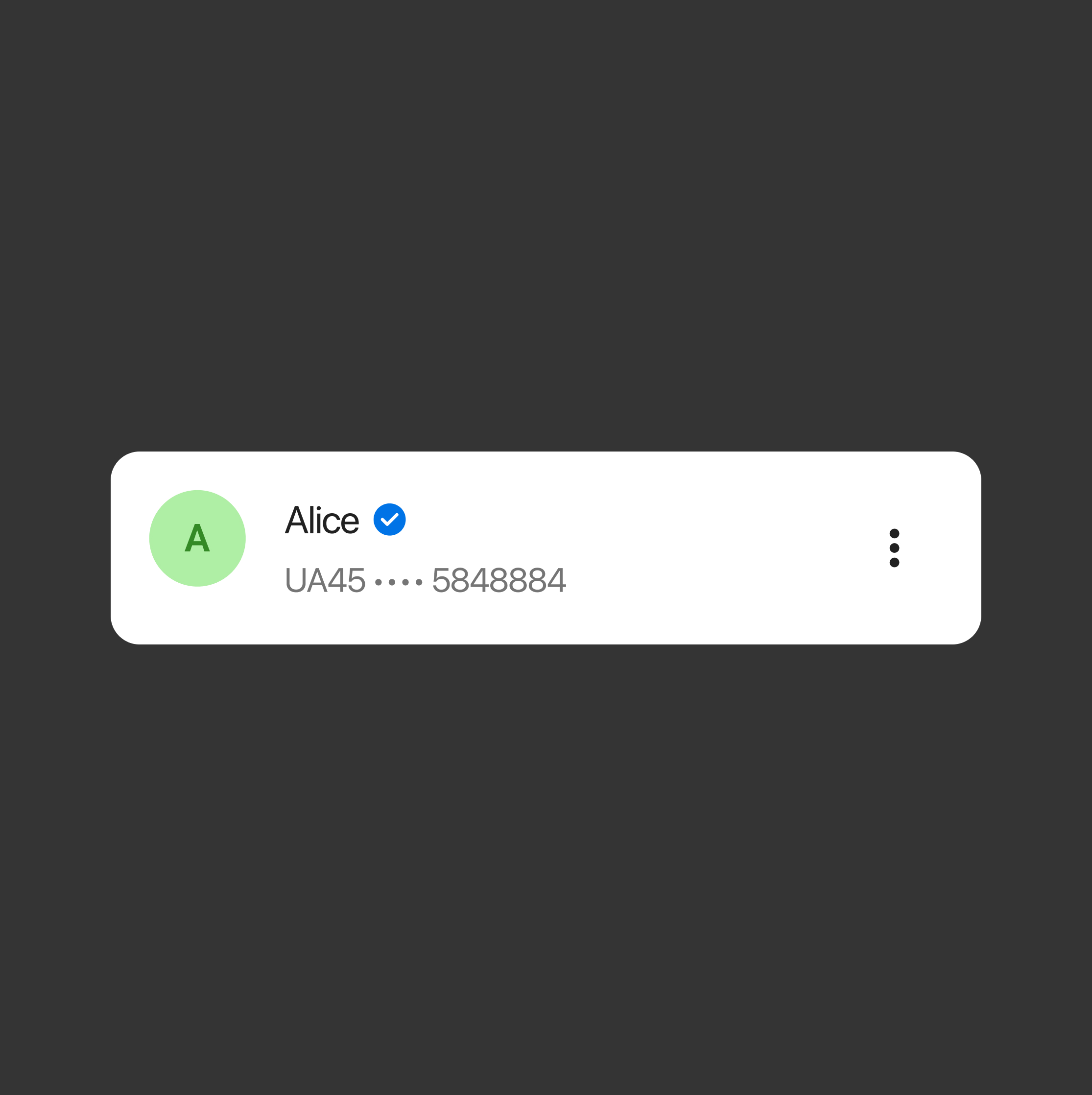
Introduced ‘Trusted users’
Trusted users can receive large amounts without repeated checks, while keeping security transparent
[ Result ]
Reduced friction and time to complete transaction
Trusted users can receive large transfers without repeated verification
[ Challenge ]
The risk of unintentional transfers
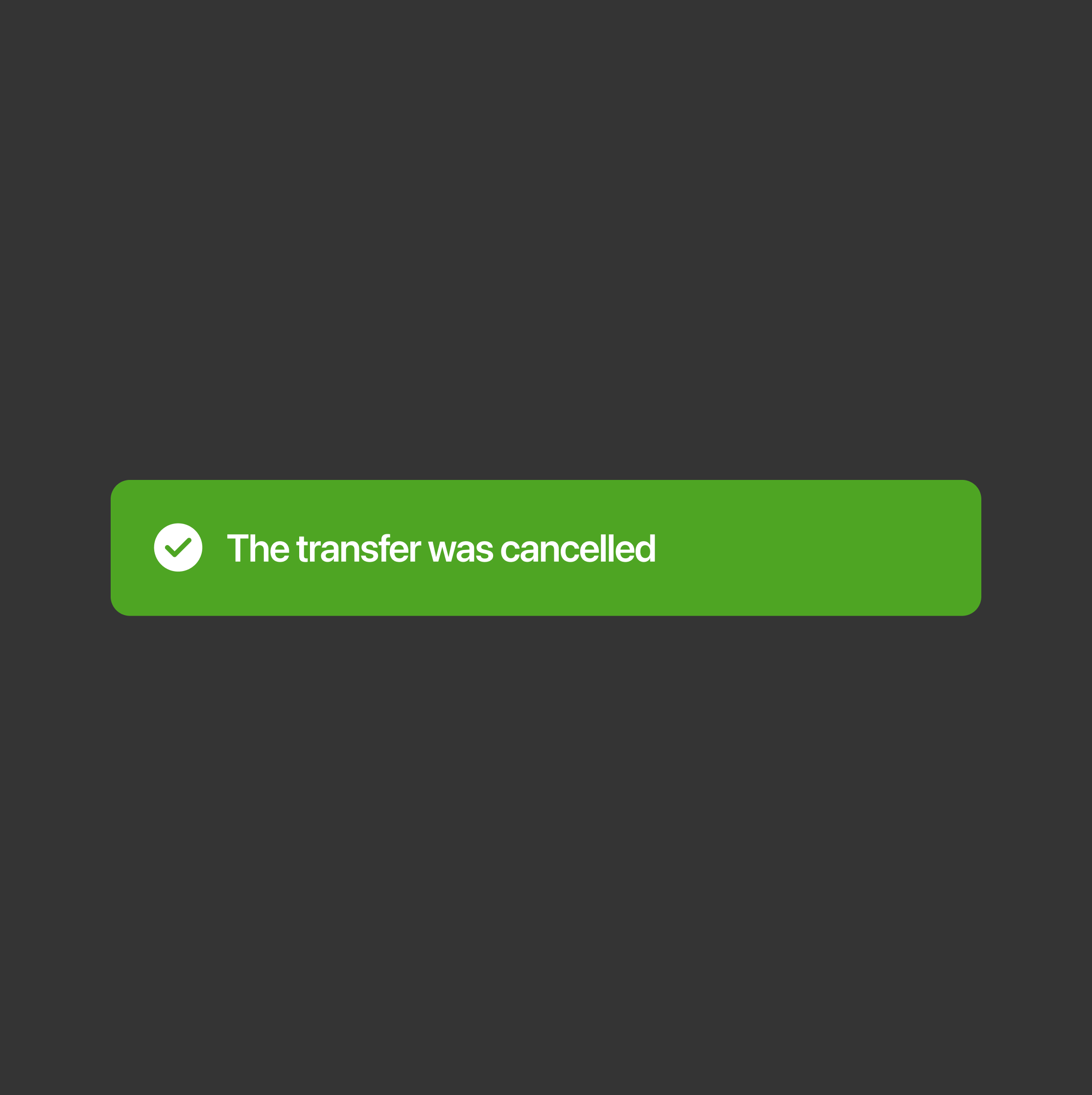
Users could accidentally send a transfer and had no immediate way to undo it
[ Solution ]
Minimize accidental transfers
Give users a quick and intuitive way to undo their action immediately after sending money
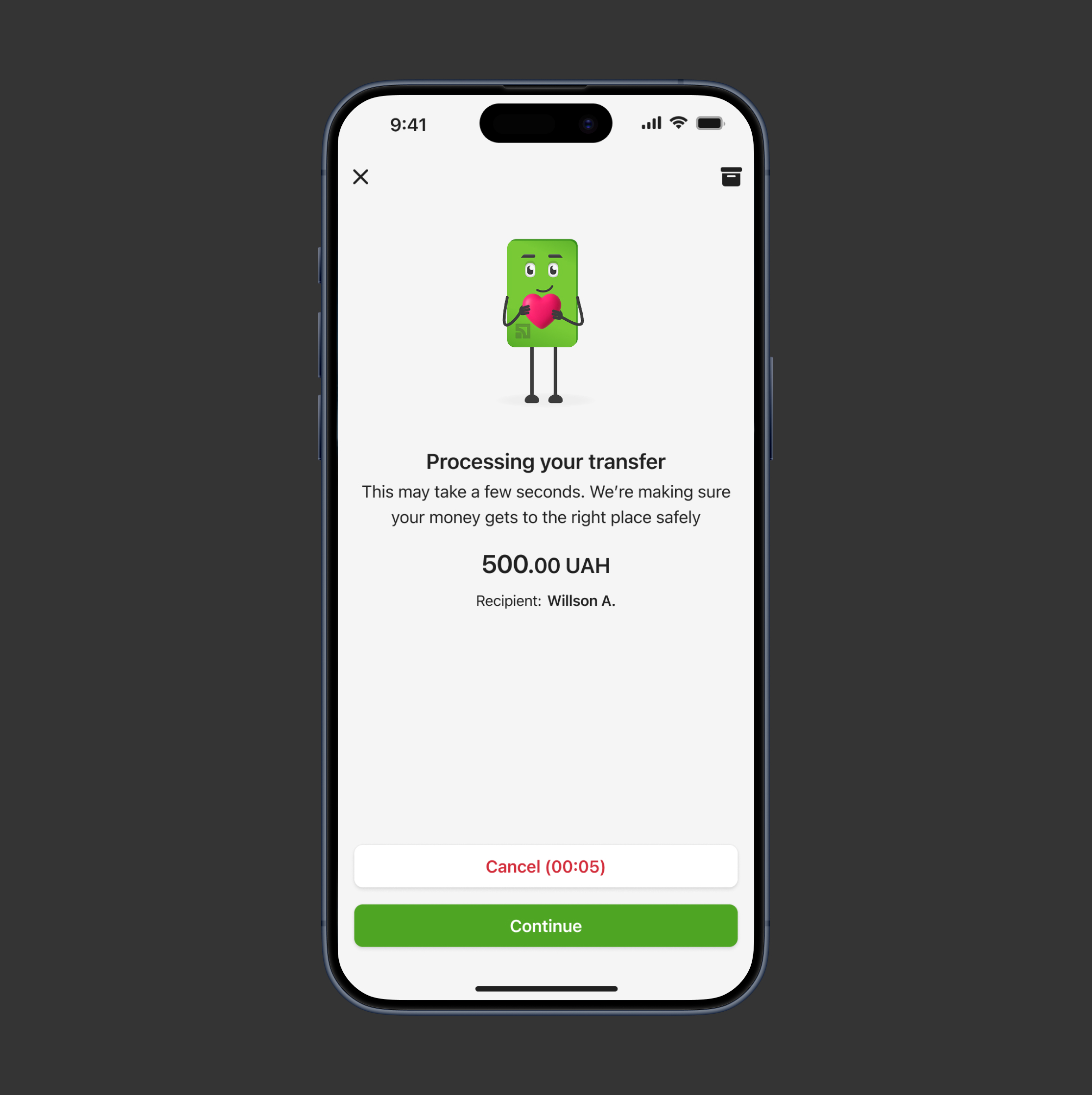
[ Action ]
Undo transfer window
Provide a 5-second window to cancel the transfer after the user taps ‘Send transfer’ button
[ Result ]
Reduced errors and increased trust
- Reduced mistakes as users can quickly cancel accidental transfers.
- Increased trust and improved the overall user experience
Usability testing after redesign
[ Usability testing ]
Money transfer usability
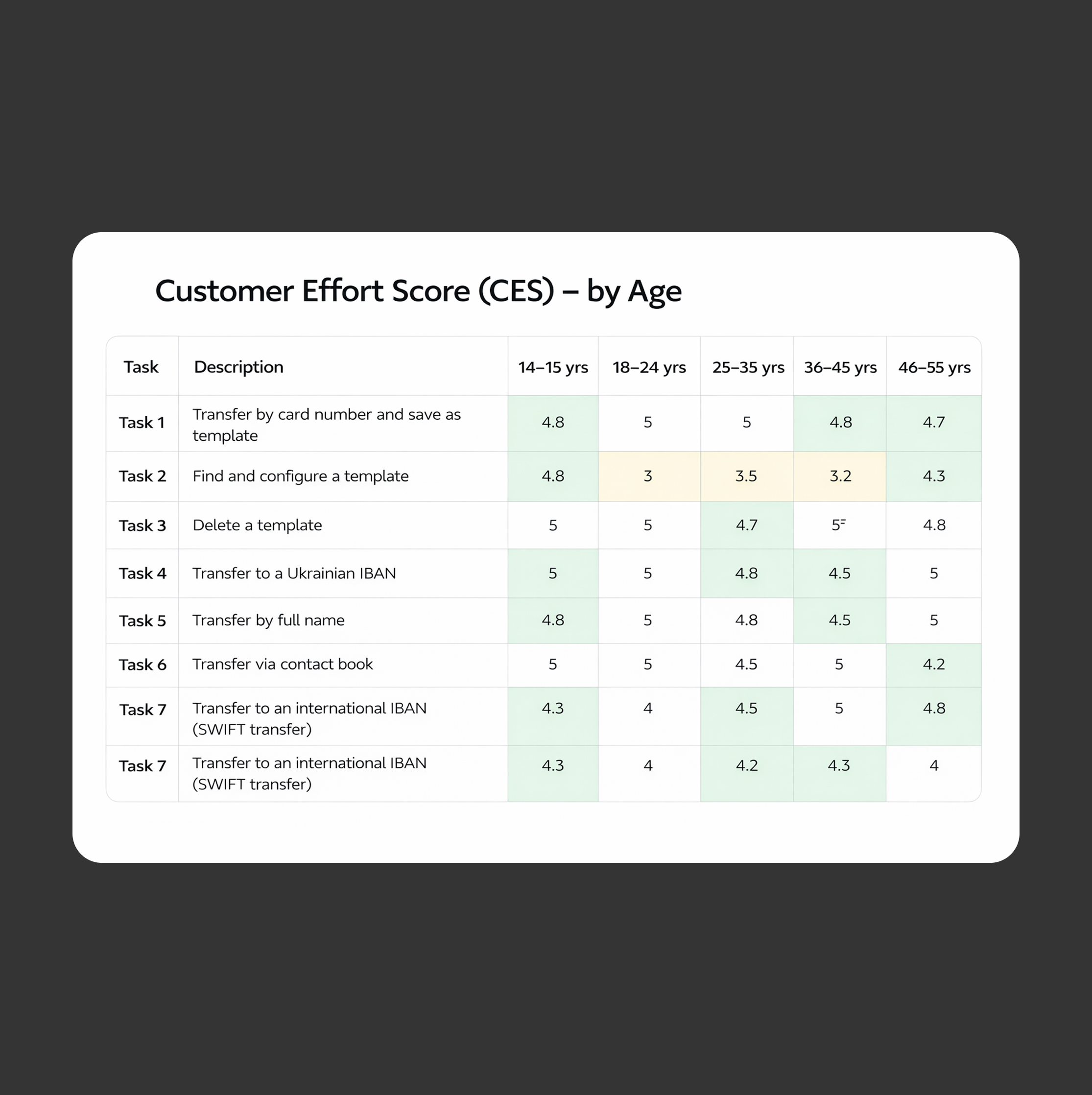
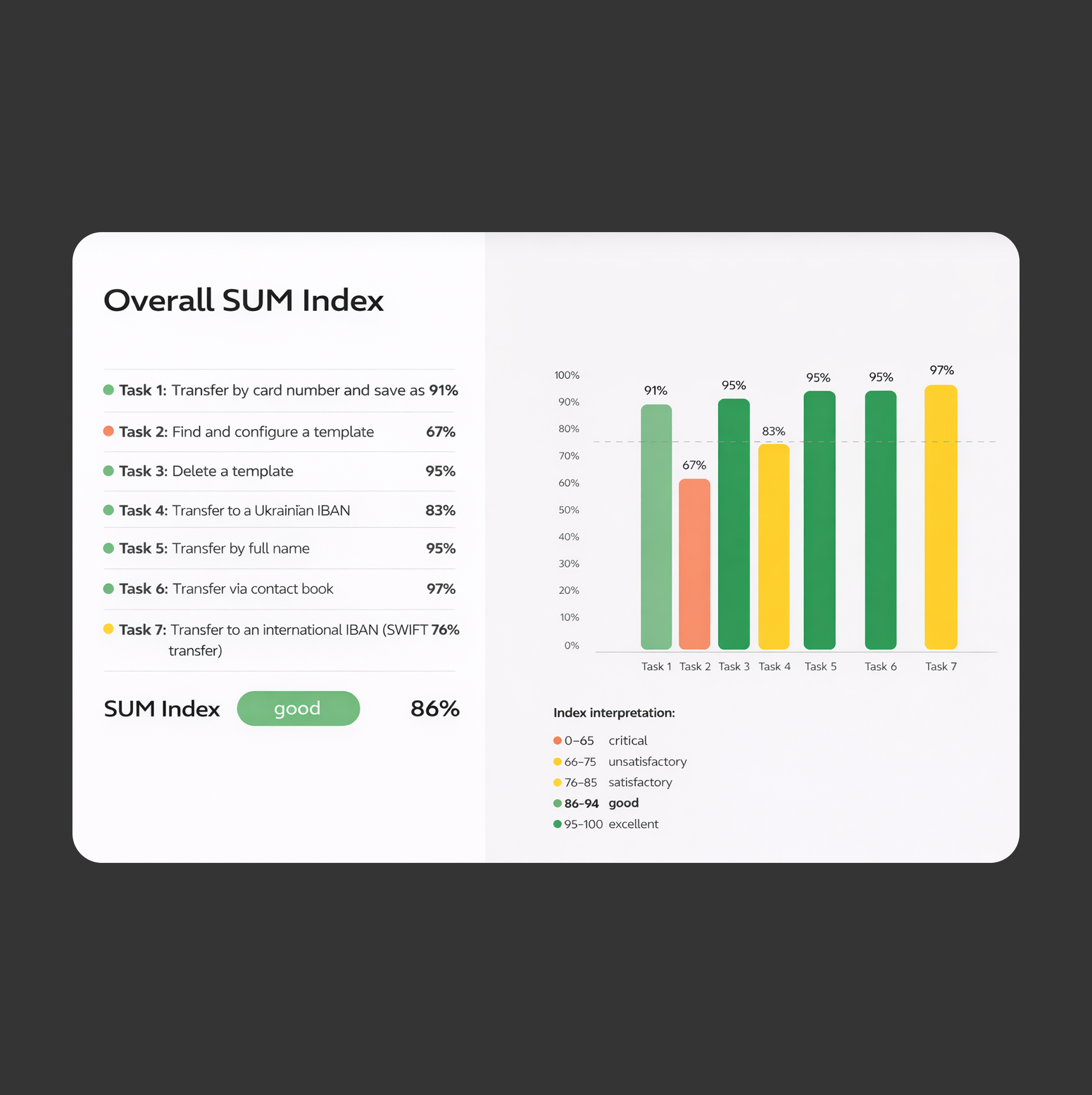
The usability testing aimed to evaluate how easily users can complete key money transfer tasks within and to measure overall effort using the SUM index
[ Testing goals ]
Transfer flow optimization
- Collect user feedback about the implemented changes in the funds transfer interface screens
- Evaluate the usability of the updated functionality using the SUM methodology, in the context of creating different types of transfers
- Identify problems that require changes in the current interface implementation (categorized by criticality: blockers, barriers, difficulties).
[ Results ]
Task performance and template issues
Most tasks achieved high performance scores (91–97%), indicating that users can complete primary transfer flows efficiently and with minimal friction
The lowest-performing task was Find and configure a template (67%), suggesting potential usability challenges in template management that required further optimization
Post-usability testing updates
[ Challenge ]
Difficulties in finding templates
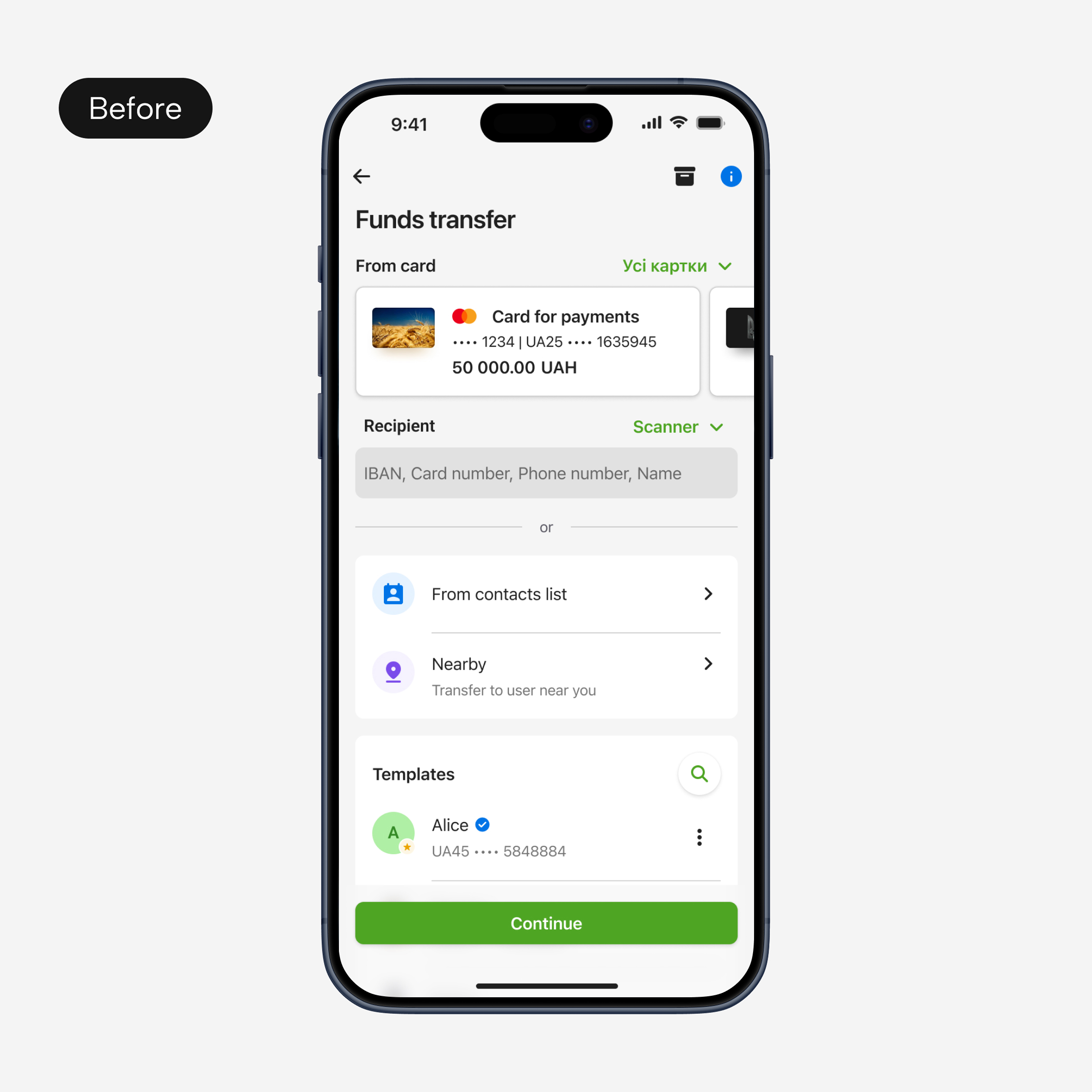
Users frequently transfer money to the same recipients, so saved templates were intended to speed up the flow. However, during usability testing, many participants could not find the templates on the Funds transfer screen
[ Task ]
Encourage users to reuse templates
Encourage users to reuse the saved templates to reduce the time needed to make a transfer
[ Actions ]
Optimized transfer flow and template access
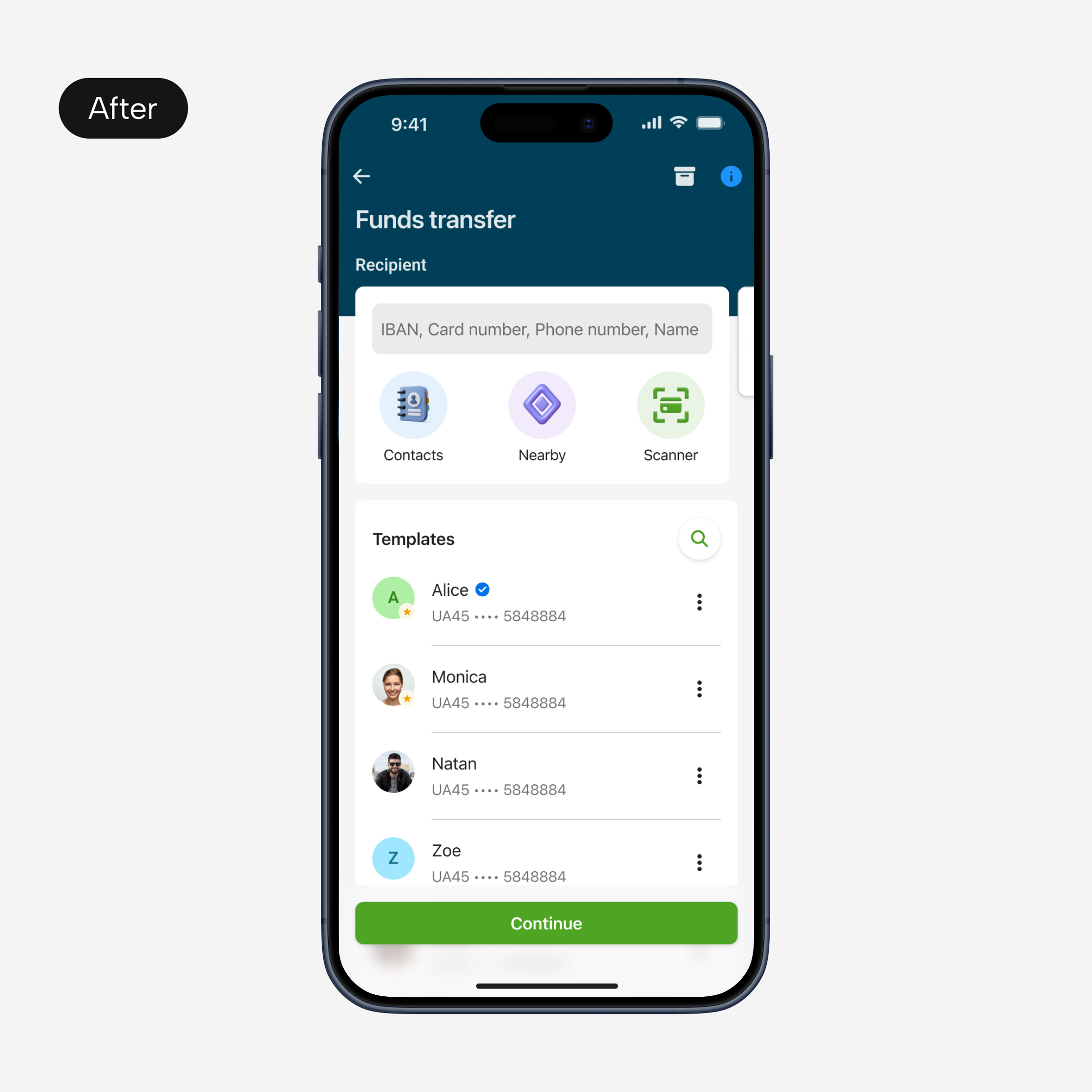
- Reworked the information hierarchy by moving card selection to the next step, allowing users to focus first on choosing the recipient
- Simplified alternative recipient selection methods (Contacts, Nearby, Scanner) into icon-based shortcuts to reduce space that they take
- Increased the visibility of the Templates section and the number of templates shown without scrolling
[ Results ]
Improved usability, faster transfers
- The funds transfer flow became clearer and more intuitive
- Users discovered templates faster
- Reuse of saved templates increased
[ Challenge ]
Difficulties in finding templates
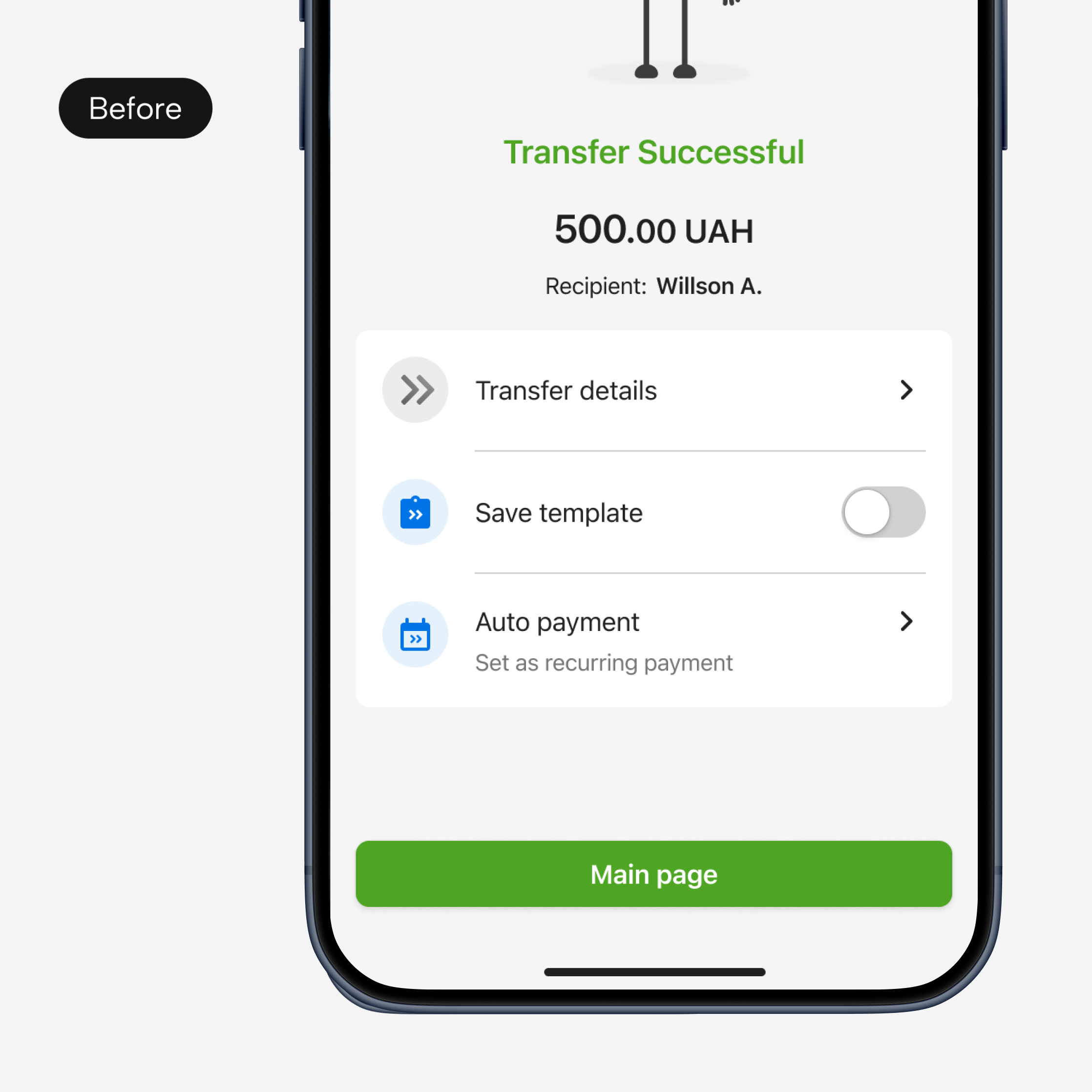
Many participants couldn’t find the templates on the Funds transfer screen
[ Task ]
Encourage users to reuse templates
Encourage users to reuse the saved templates to reduce the time needed to make a transfer
[ Action ]
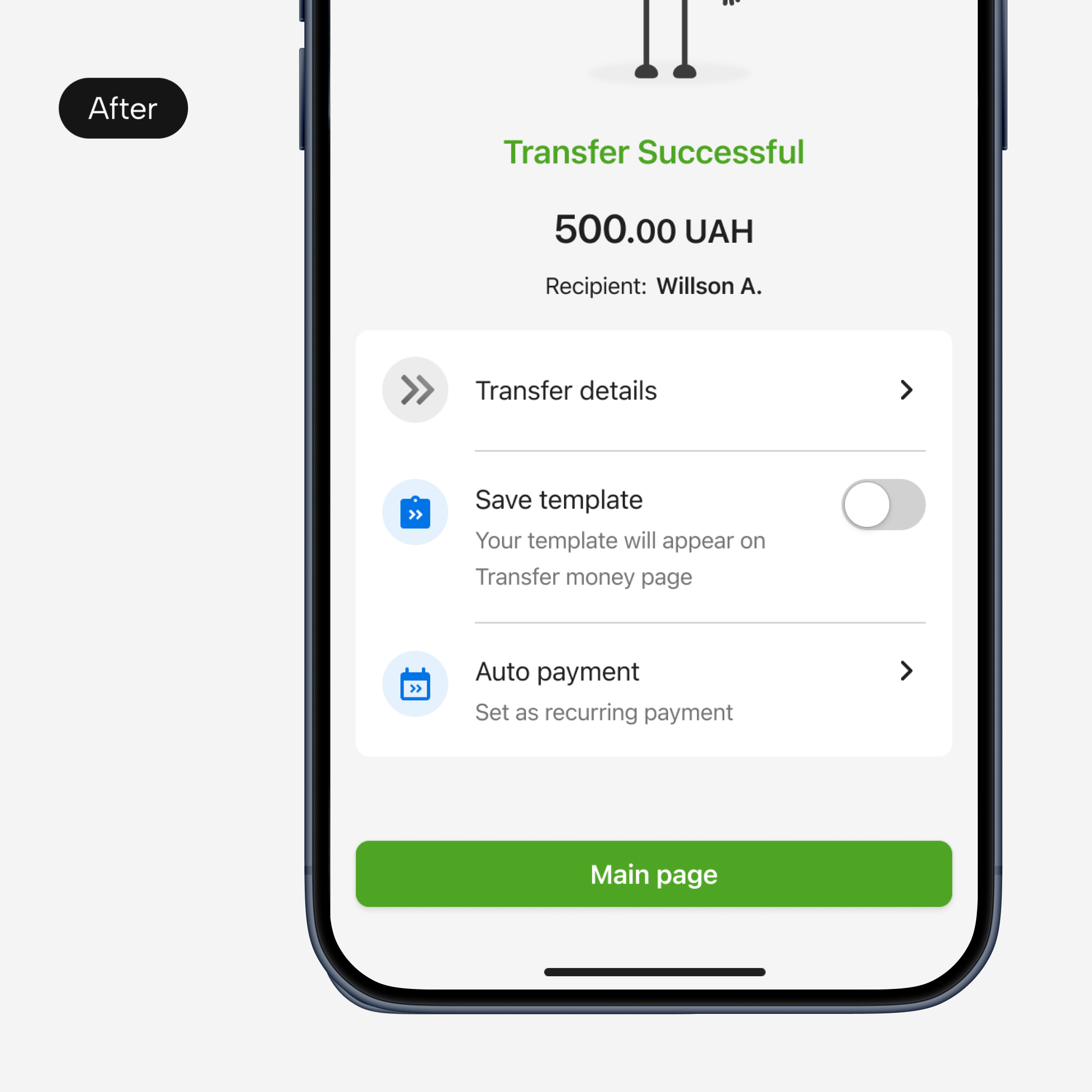
Highlighted saved template location
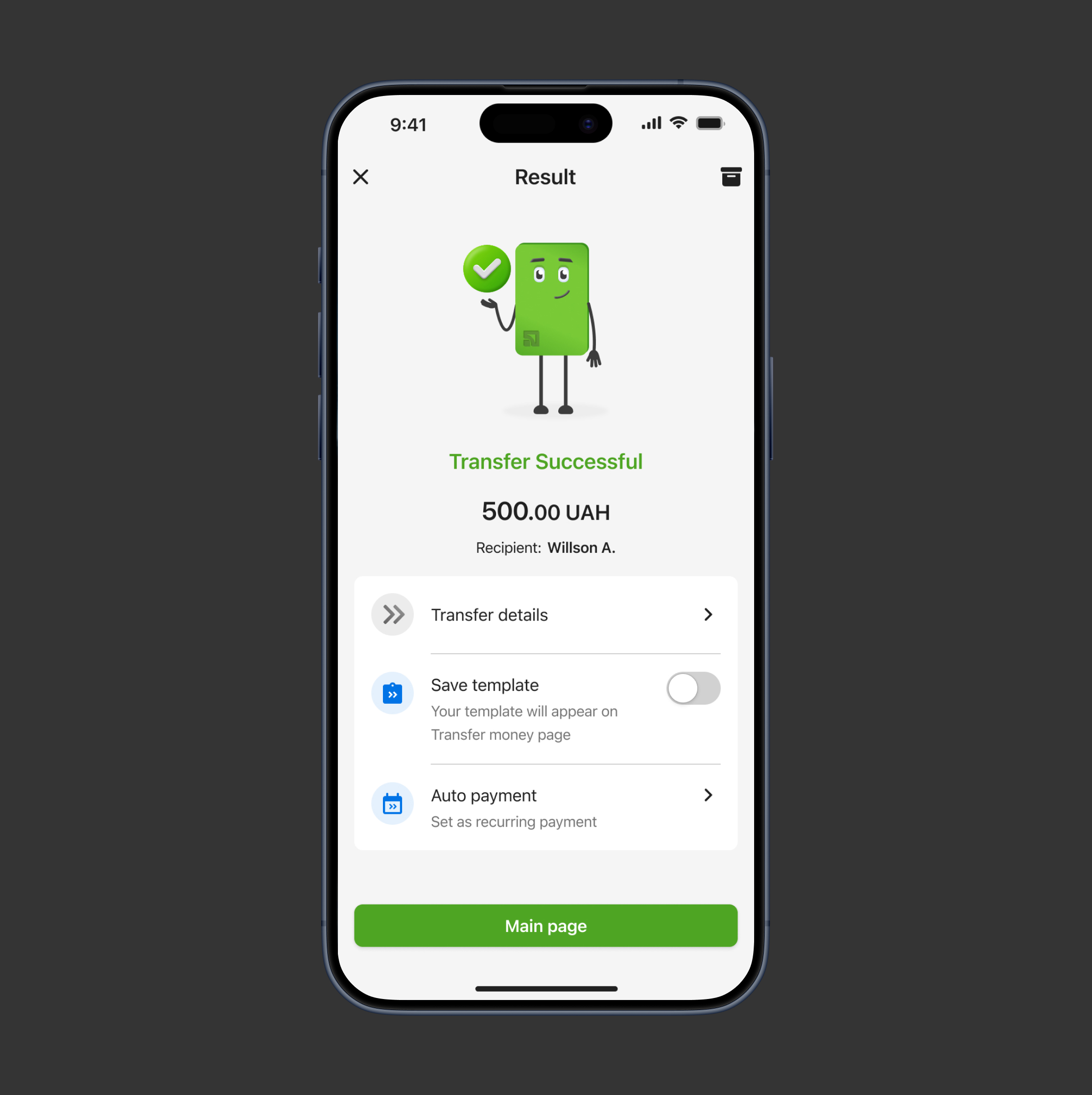
Added a short description to the “Save template” option on the success screen, explaining where the saved template can be found later in the app
[ Result ]
Increased templates usage
Users gained a clear understanding of where saved templates are stored

victoria29.vl@gmail.com
Transfer funds
Research
UX DESIGN
UI Design
prototyping
Usability testing
[ About the project ]
Funds Transfer redesign
The Funds Transfer is the key and the most frequently used services at PrivatBank that allows users to send money from their accounts to other recipients
[ Challenge ]
Faster, Safer, More intuitive
The redesign of PrivatBank’s Funds Transfer service aimed to make sending money faster, safer, and more intuitive. It focused on expanding transfer options, improving templates, reducing errors and modernizing the interface to improve usability and build user trust
[ Challenge ]
Limited transfer options
Users could only make card-to-card transfers
[ Task ]
Introduce multiple transfer methods
Transfer using IBAN, card number, phone number, or recipient name
[ Action ]
Added a ‘Super field’
‘Super field’ is a single input field where users can enter IBAN, card number, phone number, or recipient name, the system automatically detects the type of input and routes the transfer correctly
[ Result ]
Faster, safer, and more convenient transfers
- Reduced errors as automatic detection minimized mistakes when entering recipient information
- Reduced time to make a transfer as all transfer types are placed in one field
- Increased user satisfaction and trust, as the app now supports modern and convenient payment methods
[ Challenge ]
Manual entry slowed transfers and increased errors
Manually entering recipient details made transfers slow and easy to make a mistake
[ Task ]
Introduce alternative transfer methods
Introduce methods that will make the transfers easier and faster
[ Action ]
Added Nearby transfers and Scanner
Allowed users to send money to people nearby or scan a card or IBAN for fast, accurate transfers with fewer errors
[ Result ]
Faster input and fewer errors
- Reduced manual input time
- Reduced errors as automatic recognition from scanning or nearby detection minimizes mistakes when entering recipient details
[ Challenge ]
Overwhelming template list
Every transfer was automatically saved as a template. Over time, users ended up with dozens of templates, making it hard to find the right recipient
[ Task ]
Simplify template management
Make it easy for users to access the templates they actually need
[ Action ]
User-controlled templates
Allowed users to decide whether a transfer should be saved as a template, allowed users to customize templates by marking frequently used templates as favorites
[ Result ]
Reduced friction and time to complete transaction
Trusted users can receive large transfers without repeated verification
[ Challenge ]
Repetitive security steps for large transfers
Sending large amounts always required extra verification
[ Task ]
Make the process of sending large transfers faster
Reduce repetitive security steps, while maintaining user trust and system security
[ Action ]
Introduced ‘Trusted users’
Trusted users can receive large amounts without repeated checks, while keeping security transparent
[ Result ]
Reduced friction and time to complete transaction
Trusted users can receive large transfers without repeated verification
[ Challenge ]
The risk of unintentional transfers
Users could accidentally send a transfer and had no immediate way to undo it
[ Solution ]
Minimize accidental transfers
Give users a quick and intuitive way to undo their action immediately after sending money
[ Action ]
Undo transfer window
Provide a 5-second window to cancel the transfer after the user taps ‘Send transfer’ button
[ Result ]
Reduced errors and increased trust
- Reduced mistakes as users can quickly cancel accidental transfers.
- Increased trust and improved the overall user experience
Usability testing after redesign
[ Usability testing ]
Money transfer usability
The usability testing aimed to evaluate how easily users can complete key money transfer tasks within and to measure overall effort using the SUM index
[ Testing goals ]
Transfer flow optimization
- Collect user feedback about the implemented changes in the funds transfer interface screens
- Evaluate the usability of the updated functionality using the SUM methodology, in the context of creating different types of transfers
- Identify problems that require changes in the current interface implementation (categorized by criticality: blockers, barriers, difficulties).
[ Results ]
Task performance and template issues
Most tasks achieved high performance scores (91–97%), indicating that users can complete primary transfer flows efficiently and with minimal friction
The lowest-performing task was Find and configure a template (67%), suggesting potential usability challenges in template management that required further optimization
Post-usability testing updates
[ Challenge ]
Difficulties in finding templates
Users frequently transfer money to the same recipients, so saved templates were intended to speed up the flow. However, during usability testing, many participants could not find the templates on the Funds transfer screen
[ Task ]
Encourage users to reuse templates
Encourage users to reuse the saved templates to reduce the time needed to make a transfer
[ Actions ]
Optimized transfer flow and template access
- Reworked the information hierarchy by moving card selection to the next step, allowing users to focus first on choosing the recipient
- Simplified alternative recipient selection methods (Contacts, Nearby, Scanner) into icon-based shortcuts to reduce space that they take
- Increased the visibility of the Templates section and the number of templates shown without scrolling
[ Results ]
Improved usability, faster transfers
- The funds transfer flow became clearer and more intuitive
- Users discovered templates faster
- Reuse of saved templates increased
[ Challenge ]
Difficulties in finding templates
Many participants couldn’t find the templates on the Funds transfer screen
[ Task ]
Encourage users to reuse templates
Encourage users to reuse the saved templates to reduce the time needed to make a transfer
[ Action ]
Highlighted saved template location
Added a short description to the “Save template” option on the success screen, explaining where the saved template can be found later in the app
[ Result ]
Increased templates usage
Users gained a clear understanding of where saved templates are stored

victoria29.vl@gmail.com
Transfer funds
Research
UX DESIGN
UI Design
prototyping
Usability testing
[ About the project ]
Funds Transfer redesign
The Funds Transfer is the key and the most frequently used services at PrivatBank that allows users to send money from their accounts to other recipients
[ Challenge ]
Faster, Safer, More intuitive
The redesign of PrivatBank’s Funds Transfer service aimed to make sending money faster, safer, and more intuitive. It focused on expanding transfer options, improving templates, reducing errors and modernizing the interface to improve usability and build user trust
[ Challenge ]
Limited transfer options
Users could only make card-to-card transfers
[ Task ]
Introduce multiple transfer methods
Transfer using IBAN, card number, phone number, or recipient name
[ Action ]
Added a ‘Super field’
‘Super field’ is a single input field where users can enter IBAN, card number, phone number, or recipient name, the system automatically detects the type of input and routes the transfer correctly
[ Result ]
Faster, safer, and more convenient transfers
- Reduced errors as automatic detection minimized mistakes when entering recipient information
- Reduced time to make a transfer as all transfer types are placed in one field
- Increased user satisfaction and trust, as the app now supports modern and convenient payment methods
[ Challenge ]
Manual entry slowed transfers and increased errors
Manually entering recipient details made transfers slow and easy to make a mistake
[ Task ]
Introduce alternative transfer methods
Introduce methods that will make the transfers easier and faster
[ Action ]
Added Nearby transfers and Scanner
Allowed users to send money to people nearby or scan a card or IBAN for fast, accurate transfers with fewer errors
[ Result ]
Faster input and fewer errors
- Reduced manual input time
- Reduced errors as automatic recognition from scanning or nearby detection minimizes mistakes when entering recipient details
[ Challenge ]
Overwhelming template list
Every transfer was automatically saved as a template. Over time, users ended up with dozens of templates, making it hard to find the right recipient
[ Task ]
Simplify template management
Make it easy for users to access the templates they actually need
[ Action ]
User-controlled templates
Allowed users to decide whether a transfer should be saved as a template, allowed users to customize templates by marking frequently used templates as favorites
[ Result ]
Reduced friction and time to complete transaction
Trusted users can receive large transfers without repeated verification
[ Challenge ]
Repetitive security steps for large transfers
Sending large amounts always required extra verification
[ Task ]
Make the process of sending large transfers faster
Reduce repetitive security steps, while maintaining user trust and system security
[ Action ]
Introduced ‘Trusted users’
Trusted users can receive large amounts without repeated checks, while keeping security transparent
[ Result ]
Reduced friction and time to complete transaction
Trusted users can receive large transfers without repeated verification
[ Challenge ]
The risk of unintentional transfers
Users could accidentally send a transfer and had no immediate way to undo it
[ Solution ]
Minimize accidental transfers
Give users a quick and intuitive way to undo their action immediately after sending money
[ Action ]
Undo transfer window
Provide a 5-second window to cancel the transfer after the user taps ‘Send transfer’ button
[ Result ]
Reduced errors and increased trust
- Reduced mistakes as users can quickly cancel accidental transfers.
- Increased trust and improved the overall user experience
Usability testing after redesign
[ Usability testing ]
Money transfer usability
The usability testing aimed to evaluate how easily users can complete key money transfer tasks within and to measure overall effort using the SUM index
[ Testing goals ]
Transfer flow optimization
- Collect user feedback about the implemented changes in the funds transfer interface screens
- Evaluate the usability of the updated functionality using the SUM methodology, in the context of creating different types of transfers
- Identify problems that require changes in the current interface implementation (categorized by criticality: blockers, barriers, difficulties).
[ Results ]
Task performance and template issues
Most tasks achieved high performance scores (91–97%), indicating that users can complete primary transfer flows efficiently and with minimal friction
The lowest-performing task was Find and configure a template (67%), suggesting potential usability challenges in template management that required further optimization
Post-usability testing updates
[ Challenge ]
Difficulties in finding templates
Users frequently transfer money to the same recipients, so saved templates were intended to speed up the flow. However, during usability testing, many participants could not find the templates on the Funds transfer screen
[ Task ]
Encourage users to reuse templates
Encourage users to reuse the saved templates to reduce the time needed to make a transfer
[ Actions ]
Optimized transfer flow and template access
- Reworked the information hierarchy by moving card selection to the next step, allowing users to focus first on choosing the recipient
- Simplified alternative recipient selection methods (Contacts, Nearby, Scanner) into icon-based shortcuts to reduce space that they take
- Increased the visibility of the Templates section and the number of templates shown without scrolling
[ Results ]
Improved usability, faster transfers
- The funds transfer flow became clearer and more intuitive
- Users discovered templates faster
- Reuse of saved templates increased
[ Challenge ]
Difficulties in finding templates
Many participants couldn’t find the templates on the Funds transfer screen
[ Task ]
Encourage users to reuse templates
Encourage users to reuse the saved templates to reduce the time needed to make a transfer
[ Action ]
Highlighted saved template location
Added a short description to the “Save template” option on the success screen, explaining where the saved template can be found later in the app
[ Result ]
Increased templates usage
Users gained a clear understanding of where saved templates are stored

victoria29.vl@gmail.com
Transfer funds
Research
UX DESIGN
UI Design
prototyping
Usability testing
[ About the project ]
Funds Transfer redesign
The Funds Transfer is the key and the most frequently used services at PrivatBank that allows users to send money from their accounts to other recipients
[ Challenge ]
Faster, Safer, More intuitive
The redesign of PrivatBank’s Funds Transfer service aimed to make sending money faster, safer, and more intuitive. It focused on expanding transfer options, improving templates, reducing errors and modernizing the interface to improve usability and build user trust
[ Challenge ]
Limited transfer options
Users could only make card-to-card transfers
[ Task ]
Introduce multiple transfer methods
Transfer using IBAN, card number, phone number, or recipient name
[ Action ]
Added a ‘Super field’
‘Super field’ is a single input field where users can enter IBAN, card number, phone number, or recipient name, the system automatically detects the type of input and routes the transfer correctly
[ Result ]
Faster, safer, and more convenient transfers
- Reduced errors as automatic detection minimized mistakes when entering recipient information
- Reduced time to make a transfer as all transfer types are placed in one field
- Increased user satisfaction and trust, as the app now supports modern and convenient payment methods
[ Challenge ]
Manual entry slowed transfers and increased errors
Manually entering recipient details made transfers slow and easy to make a mistake
[ Task ]
Introduce alternative transfer methods
Introduce methods that will make the transfers easier and faster
[ Action ]
Added Nearby transfers and Scanner
Allowed users to send money to people nearby or scan a card or IBAN for fast, accurate transfers with fewer errors
[ Result ]
Faster input and fewer errors
- Reduced manual input time
- Reduced errors as automatic recognition from scanning or nearby detection minimizes mistakes when entering recipient details
[ Challenge ]
Overwhelming template list
Every transfer was automatically saved as a template. Over time, users ended up with dozens of templates, making it hard to find the right recipient
[ Task ]
Simplify template management
Make it easy for users to access the templates they actually need
[ Action ]
User-controlled templates
Allowed users to decide whether a transfer should be saved as a template, allowed users to customize templates by marking frequently used templates as favorites
[ Result ]
Reduced friction and time to complete transaction
Trusted users can receive large transfers without repeated verification
[ Challenge ]
Repetitive security steps for large transfers
Sending large amounts always required extra verification
[ Task ]
Make the process of sending large transfers faster
Reduce repetitive security steps, while maintaining user trust and system security
[ Action ]
Introduced ‘Trusted users’
Trusted users can receive large amounts without repeated checks, while keeping security transparent
[ Result ]
Reduced friction and time to complete transaction
Trusted users can receive large transfers without repeated verification
[ Challenge ]
The risk of unintentional transfers
Users could accidentally send a transfer and had no immediate way to undo it
[ Solution ]
Minimize accidental transfers
Give users a quick and intuitive way to undo their action immediately after sending money
[ Action ]
Undo transfer window
Provide a 5-second window to cancel the transfer after the user taps ‘Send transfer’ button
[ Result ]
Reduced errors and increased trust
- Reduced mistakes as users can quickly cancel accidental transfers.
- Increased trust and improved the overall user experience
Usability testing after redesign
[ Usability testing ]
Money transfer usability
The usability testing aimed to evaluate how easily users can complete key money transfer tasks within and to measure overall effort using the SUM index
[ Testing goals ]
Transfer flow optimization
- Collect user feedback about the implemented changes in the funds transfer interface screens
- Evaluate the usability of the updated functionality using the SUM methodology, in the context of creating different types of transfers
- Identify problems that require changes in the current interface implementation (categorized by criticality: blockers, barriers, difficulties).
[ Results ]
Task performance and template issues
Most tasks achieved high performance scores (91–97%), indicating that users can complete primary transfer flows efficiently and with minimal friction
The lowest-performing task was Find and configure a template (67%), suggesting potential usability challenges in template management that required further optimization
Post-usability testing updates
[ Challenge ]
Difficulties in finding templates
Users frequently transfer money to the same recipients, so saved templates were intended to speed up the flow. However, during usability testing, many participants could not find the templates on the Funds transfer screen
[ Task ]
Encourage users to reuse templates
Encourage users to reuse the saved templates to reduce the time needed to make a transfer
[ Actions ]
Optimized transfer flow and template access
- Reworked the information hierarchy by moving card selection to the next step, allowing users to focus first on choosing the recipient
- Simplified alternative recipient selection methods (Contacts, Nearby, Scanner) into icon-based shortcuts to reduce space that they take
- Increased the visibility of the Templates section and the number of templates shown without scrolling
[ Results ]
Improved usability, faster transfers
- The funds transfer flow became clearer and more intuitive
- Users discovered templates faster
- Reuse of saved templates increased
[ Challenge ]
Difficulties in finding templates
Many participants couldn’t find the templates on the Funds transfer screen
[ Task ]
Encourage users to reuse templates
Encourage users to reuse the saved templates to reduce the time needed to make a transfer
[ Action ]
Highlighted saved template location
Added a short description to the “Save template” option on the success screen, explaining where the saved template can be found later in the app
[ Result ]
Increased templates usage
Users gained a clear understanding of where saved templates are stored
